
X Exclusive Threads: The Complete Guide to Creator Subscriptions on X in 2026

What Are X Exclusive Threads?
X Exclusive Threads is a new feature inside the X Creator Subscriptions platform. It lets a creator post a tweet thread where the first post or few posts are visible to everyone, but the rest of the thread is locked behind a subscription paywall.
Before this update, creators had two choices: post everything in public and earn nothing directly from the content, or lock the entire post behind a paywall and risk people not subscribing because they had no idea what they were paying for.
X Exclusive Threads solves that problem. You show enough of the content to make people curious, then ask them to subscribe to read the rest. A subscribe button appears directly inside the thread at the point where the content becomes locked. The reader does not need to go anywhere else to sign up.
Think of it like a newspaper that puts the first three paragraphs of a story online for free, then asks you to subscribe to read the rest. X Exclusive Threads works the same way, but for tweet threads.
The feature was announced by X head of product Nikita Bier and the official X Creators account on March 5, 2026. A gif shared alongside the announcement showed how the subscribe button appears inside the conversation chain, making the signup process feel natural rather than disruptive.
Creator Subscriptions 2.0 is here: powerful new tools to grow your subscribers and earn more.
Introducing Exclusive Threads — lock any post in a thread for subscribers only. Tease in the parent, monetize the rest. Subscribe buttons are now embedded directly in the conversation. pic.twitter.com/j8Bg3bMDiW
— Creators (@XCreators) March 5, 2026
How to Set Up X Exclusive Threads: Step by Step
Here is exactly how to use X Exclusive Threads once you have been approved for Creator Subscriptions.
- Open the X app on iOS, Android, or web and tap the compose button to start a new thread.
- Write your first post. This is the public teaser that everyone can see. Make it compelling enough that people want to keep reading.
- Tap the plus button to add the next post in the thread, just as you would with a regular thread.
- When you reach the post where you want the paywall to start, tap the lock icon or the Exclusive option in the audience settings for that post.
- All posts after that point will be marked as subscriber-only. You can lock from any point in the thread.
- Post the thread. The public portion goes live immediately. Anyone who is not a subscriber will see a subscribe button in place of the locked content.
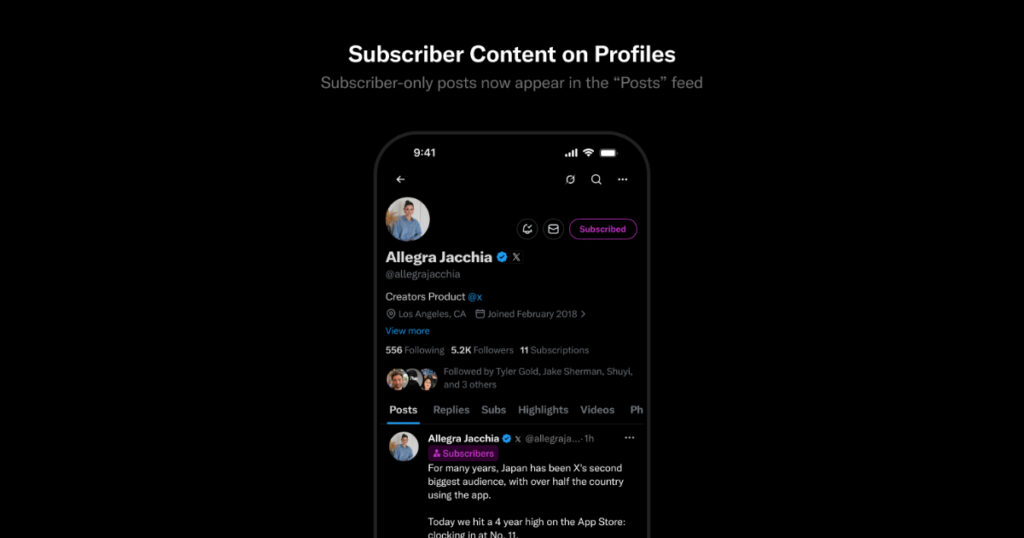
Your exclusive thread posts will now appear in your main profile feed rather than being buried in a separate Subscriptions tab. X made this change as part of the same update, which means your subscriber content gets more visibility than it did before.
Who Can Use X Exclusive Threads? Eligibility Requirements
X Exclusive Threads are only available to creators who are approved for the Creator Subscriptions program. Here are the requirements you need to meet before you can apply.
- You must have at least 500 followers.
- Your account must be at least 30 days old.
- You must be subscribed to X Premium or X Premium Plus.
- You must be based in a country where Creator Subscriptions are available. As of March 2026, the program is open globally for eligible accounts.
- Your account must comply with X’s monetization policy and have no recent policy violations.
- You must have posted actively in the past 30 days.
Once approved, you can set your subscription price and start creating exclusive content. Applications are reviewed faster than they used to be. X says it has sped up the review process as part of this update, though it does not give a specific timeline.
How Much Can You Earn from X Creator Subscriptions?
Before going all in on X Exclusive Threads, it helps to understand the numbers behind the program.
Subscription Pricing
Creators can choose from three price points for their subscription tier:
$2.99 / month Best for creators building an audience who want low friction sign-ups.
$4.99 / month The most commonly chosen price. Balances accessibility with real revenue.
$9.99 / month Best for niche experts, financial analysts, or creators with highly valuable information.
Revenue Split
X keeps a percentage of each subscription. How much it keeps depends on where the subscriber signs up. If someone subscribes through iOS, Apple takes a 30 percent cut before X pays out the rest. If someone subscribes through the web or Android, the processing fee is closer to 8 to 10 percent. X has said creators keep the majority of what is left after platform fees.
Real Numbers from X
X has paid out more than $45 million to creators through the Creator Revenue Sharing program since it launched in 2023. For 2026, X says it has more than doubled the revenue pool available to creators, driven by growth in X Premium subscriptions.
For context, here is what different subscriber counts could look like at the $4.99 tier on web, assuming a roughly 85 percent net payout rate after processing fees:
100 subscribers Approximately $424 per month
500 subscribers Approximately $2,120 per month
2,000 subscribers Approximately $8,480 per month
Matt Taibbi, the journalist, priced his subscription near $2 to make it easy for readers to support his investigative threads. Stock analysis creator @Banana3Stocks priced higher because the financial value of the content justified it. Your pricing should match what your content is genuinely worth to your audience.
Why Partial Paywalling Works Better Than Full Gating
The key insight behind X Exclusive Threads is a well-known principle in subscription marketing: people are far more likely to pay for something they have already started reading than something they have never seen.
When you lock an entire thread behind a paywall, you are asking someone to pay for something they know nothing about. The conversion rate on that kind of gate is low. People scroll past without feeling any pull.
When you give away the first part for free, something different happens. The reader is already invested. They have read enough to get interested. The subscribe button appears at the exact moment their curiosity is highest. That is when they are most likely to pay.
Newsletter platforms like Substack have used this approach for years. Articles that show a preview and then ask for a subscription consistently convert better than paywalls that block access from the first word. X Exclusive Threads brings that same logic to social media threads.
There is also a reach benefit. Because the opening of your thread is public, it can be shared, liked, and commented on by anyone. Your best content can still spread organically. It just monetizes when it converts.
X Exclusive Threads vs Competitors: How Does It Stack Up?
X is not the only place creators can put content behind a paywall. Here is how it compares to the main alternatives.
| Feature | X Exclusive Threads | Meta Threads | Patreon | Substack |
| Partial paywall on posts | Yes | No | No | Yes (on articles) |
| Subscribe button in content | Yes | No monetization yet | No (external page) | Yes (in article) |
| Built-in audience | Yes (your followers) | Yes | Must drive own traffic | Growing discovery |
| Platform fee | 8-30% (varies by payment method) | No subscription tool | 8% platform + payment fee | 10% platform fee (free plan) |
Meta Threads has no subscription or monetization tool at all as of March 2026. Patreon requires creators to send fans to an external page, which adds friction. Substack lets writers preview articles before the paywall, which is similar to X Exclusive Threads, but Substack does not have the same real-time, public-first feed that X has built. X Exclusive Threads is currently the only tool that puts a subscribe button directly inside a live social media conversation.
The Irony of the Name: Why Calling It ‘Exclusive Threads’ Is a Bold Move
X’s biggest text-based social media rival is Meta’s Threads app. Naming this feature Exclusive Threads is not an accident.
X has a habit of using the word threads in a different way. On X, a thread refers to a chain of connected tweets posted by one person. It is a term that has been used on the platform for years, long before Meta launched its Threads app in 2023. So while the naming is clearly a dig at Meta, X can also argue with a straight face that the name makes complete sense on its own terms.
What it signals to creators is this: X sees itself as the platform for serious text-based content, and it wants to be the place where that content gets monetized. Meta Threads has no monetization tools at all right now. X is betting that creators who want to earn from their writing will choose the platform that actually pays them.
What Else Changed in the Creator Subscriptions Update?
X Exclusive Threads was the headline feature, but it was not the only thing X announced. Here is what else changed in the same update.
Shareable Subscription Cards
Creators can now generate a card that promotes their subscription. This card can be shared as a post on X, used in a bio, or sent to potential subscribers anywhere. It works like a promotional flyer that lives inside X.
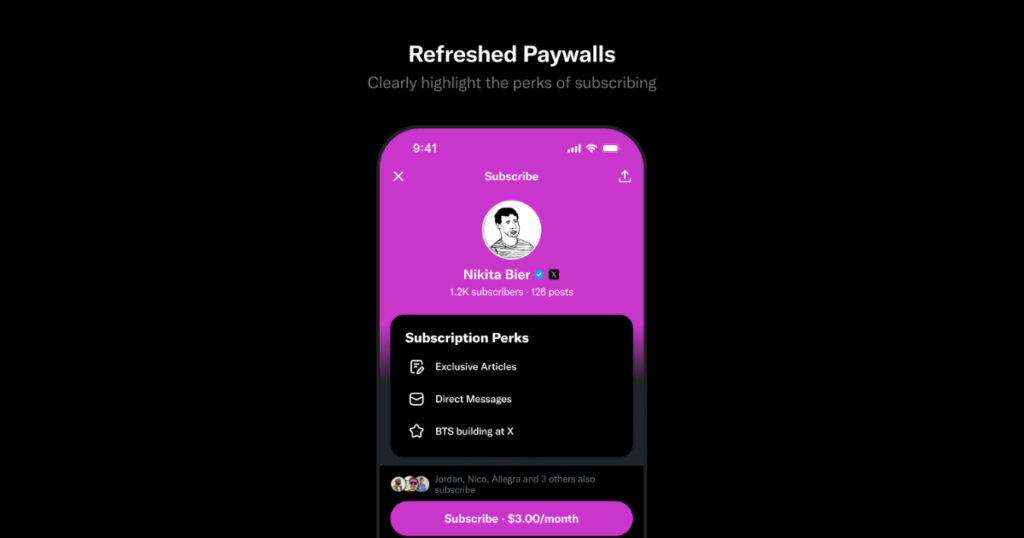
Refreshed Paywall Design
The screen that subscribers see when they hit the paywall has been redesigned. Creators can now highlight the benefits of subscribing in a cleaner layout. The goal is to make the value clearer at the moment someone decides whether to pay.
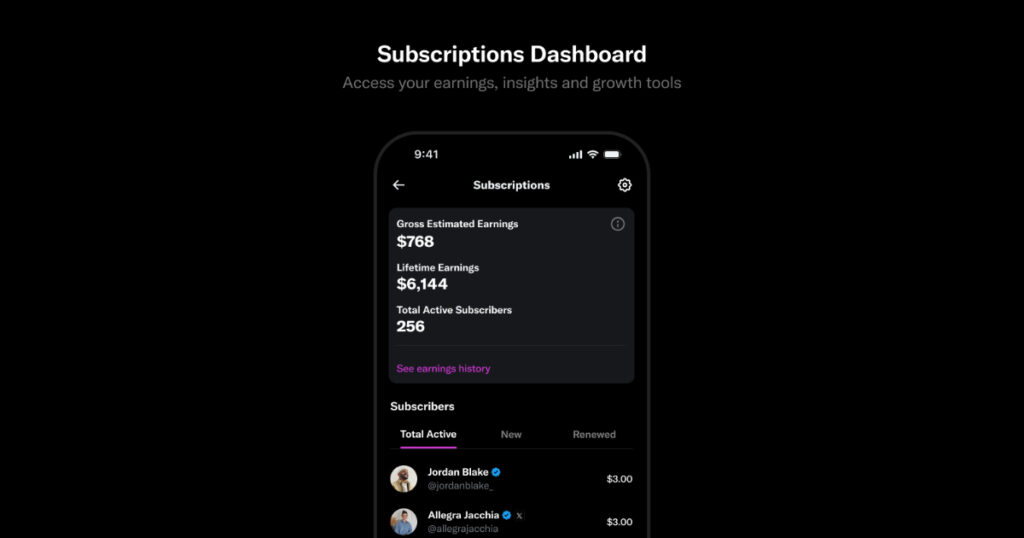
New Earnings Dashboard
Creators get a new dashboard that shows subscriber counts, earnings, and growth trends in one place. X has also added built-in growth tools inside the dashboard, so creators can take action on their analytics without leaving the page.
Faster Onboarding
Setting up a subscription used to take several steps. X has cut it down to two steps. It has also said it has sped up how long it takes for applications to be reviewed, though it has not given a specific number of days.
Paid Partnership Label
X also formally launched a new label for sponsored posts. Instead of having to write #ad or #sponsored in the text of a post, creators can now apply a Paid Partnership label that appears below the content. This makes it easier to comply with advertising regulations in most countries without cluttering the post itself. The label can also be added after a post has already gone live, which is useful if a creator forgets to add it at the time of posting.
6 Tips for Creators Using X Exclusive Threads
Here is how to get the most out of X Exclusive Threads from day one.
- Make the teaser do real work. The public part of your thread is your sales pitch. It should make the reader feel like they are already getting value, and then stop at the most interesting point. End on a question, a reveal, or a promise. The reader should think: I need to know what comes next.
- Keep your first post short and punchy. Longer opening posts tend to lose people before they reach the paywall. Say just enough to hook them, then lock the rest.
- Tell people what they are getting. Before or right at the paywall, state clearly what subscribers will unlock. If it is a 10-step breakdown, say that. If it is raw data you have never published before, say that. Specifics convert better than vague promises.
- Price based on your content type. Stock tips and financial analysis can support $9.99. Commentary and opinion threads tend to do better at $4.99 or lower. Match the price to what the information is worth to your specific audience.
- Use the shareable subscription card. Post it regularly so new followers know you have a subscription. Pin it to your profile. Add it to your bio link. The more touchpoints you give people to subscribe, the more will.
- Watch your dashboard weekly. The new dashboard shows you which threads drove the most subscriptions. Do more of what is working. Drop what is not.
Frequently Asked Questions About X Exclusive Threads
Do I need X Premium to use X Exclusive Threads?
Yes. You need an active X Premium or X Premium Plus subscription to be eligible for the Creator Subscriptions program, which is required to use Exclusive Threads.
Can I lock the very first post in a thread?
No. The whole point of Exclusive Threads is that at least the first post is public so people can see what they are subscribing to. You can lock from the second post onward.
Where do my exclusive posts appear?
As of this update, your exclusive thread posts appear in your main profile feed rather than being hidden in a separate Subscriptions tab. This gives them more visibility.
Can subscribers share or quote the locked parts of my thread?
Subscribers can reply, like, and quote exclusive posts. Non-subscribers cannot see the content of locked posts, only the paywall prompt.
What happens if someone cancels their subscription?
They lose access to subscriber-only content immediately or at the end of their billing period depending on when they cancel. They can still see the public portions of your threads.
Is there a minimum number of subscribers I need before I can use this?
No minimum subscriber count is required for the feature itself. You just need to meet the eligibility requirements for Creator Subscriptions (500 followers, Premium subscription, clean account standing).
Can I change the price of my subscription after I launch?
Yes. You can update your subscription price. Existing subscribers will typically keep their current rate until their next renewal cycle, after which the new price applies.
Is X Exclusive Threads available worldwide?
Creator Subscriptions are available globally for eligible accounts as of 2026. Some countries may have restrictions based on local payment laws. Check the X help center for the current list of supported countries.
Is X Exclusive Threads Worth It for Creators?
X Exclusive Threads fills a gap that has existed on social media for a long time. Creators have always had to choose between reach and revenue: post publicly and get seen, or post privately and get paid. This feature gives you both at the same time.
It is not a perfect tool. Your earning potential is still tied to how many subscribers you can convert, and that depends on the quality and consistency of your content more than the tool itself. The fees can add up, especially if most of your subscribers come through iOS.
But the fundamentals are right. The paywall is in the right place, the subscribe button is in the right place, and the content that drives subscriptions stays in the main feed where it can be found. For creators who already use threads as their main content format, this is a natural and low-friction way to start earning directly on the platform.
Combined with the new dashboard, the shareable subscription card, and the faster onboarding, the overall Creator Subscriptions update moves X meaningfully closer to being a genuine home for professional content creators.