
iOS 26.3 new features and what they mean for your iPhone

Apple just dropped the latest update for your iPhone, and if you have been following the news, you know that iOS 26.3 new features are largely about playing nice with others. It is not every day we see Apple making it easier for people to leave their ecosystem, but that is exactly what is happening here. Whether you are a diehard Apple fan or someone who has been eyeing the latest Android flagship, this update has something that will change how you use your device.
The update arrived on Wednesday, February 11, and it serves as a bridge between the current system and the highly anticipated iOS 26.4. While 26.4 is expected to bring the big Siri overhaul powered by Gemini, this current version is focused on utility, privacy, and compliance with international regulations.
Moving from iPhone to Android is now a breeze
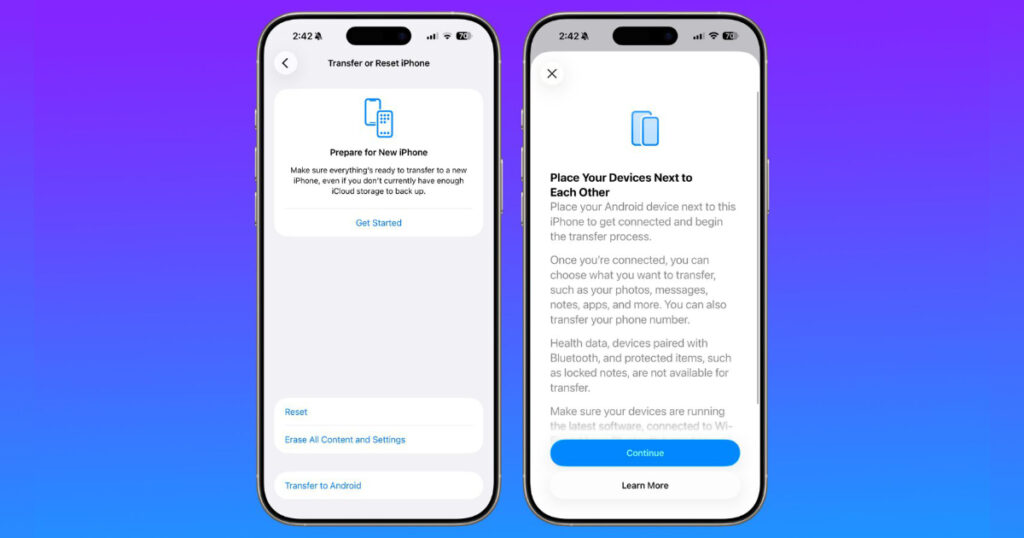
One of the most surprising iOS 26.3 new features is a tool that helps you move your data to an Android device. Usually, Apple likes to keep you locked in, but thanks to a joint effort with Google and pressure from the European Union, the process is now native to the settings menu. You can find this under General, then Transfer or Reset iPhone, and finally Transfer to Android.
The way it works is pretty clever. You just place your iPhone next to the Android device and it initiates a wireless transfer. It moves your photos, messages, notes, and even your apps. It does not move everything though. You will still have to manually handle things like your health data and locked notes, but for the average person, this removes the biggest headache of switching phones. It is a win for consumer choice, even if Apple is doing it a bit reluctantly.
A new layer of location privacy
Privacy has always been a big selling point for the iPhone, and iOS 26.3 new features double down on that with a setting called Limit Precise Location. This is specifically for people using the newer iPhones that carry Apple’s own C1 or C1X modems, like the iPhone 16e or the iPhone Air.
In the past, your cellular carrier could see exactly which street corner you were standing on because of how your phone connects to towers. Now, you can toggle a switch that tells the carrier to back off a bit. Instead of seeing your exact coordinates, they might only see the general neighborhood you are in. Currently, Boost Mobile is the only carrier in the US supporting this, but expect more to jump on board soon. It is a great move for anyone who feels like they are being watched a little too closely by their service provider.
Changes exclusive to the European Union
If you live in Europe, the iOS 26.3 new features list looks a lot more interesting. Because of the Digital Markets Act, Apple has had to open up some of its most guarded features. The biggest change is Notification Forwarding for third party smartwatches. Until now, if you wanted the full notification experience on your wrist, you had to buy an Apple Watch. Now, brands like Garmin or Pebble can receive and even reply to messages just like the Apple Watch does.
There is also a new proximity pairing feature for third party headphones. It mimics that magic moment when you open a pair of AirPods and a card pops up on your screen. Now, other brands can use the same Bluetooth protocol to make pairing just as seamless. It is all about making the iPhone a more open platform, even if these specific perks are locked behind a geographical border for now.
Small tweaks to the interface
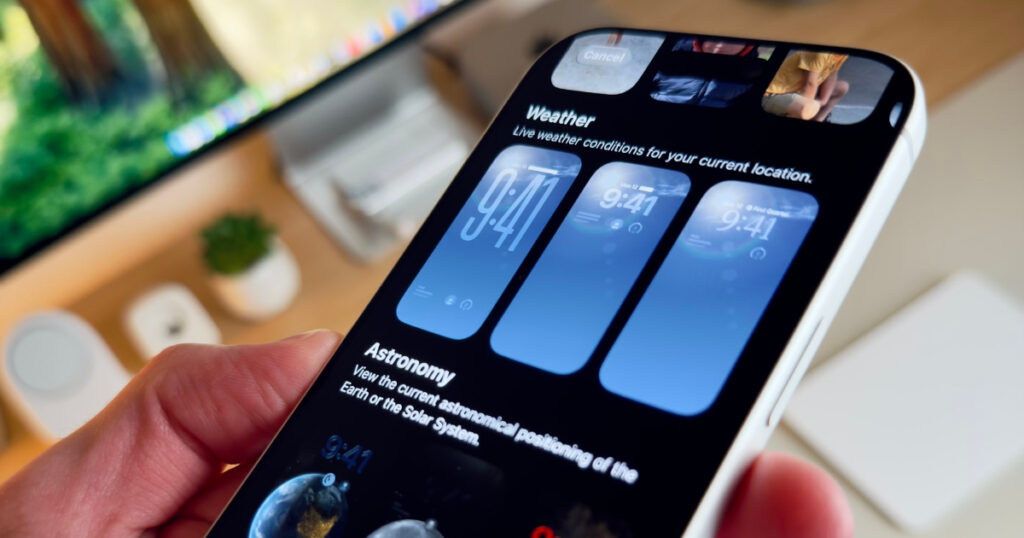
Not everything in this update is a legal requirement. Apple also took some time to clean up the wallpaper gallery. In previous versions, the Weather and Astronomy wallpapers were lumped together in one section. With iOS 26.3, they have been split into their own rows.
The Weather section now features three new presets that change based on what is happening outside your window. If it is raining in London, your wallpaper shows rain. If the sun is out in Los Angeles, your screen reflects that. It is a small touch, but it makes the phone feel a bit more alive and personalized.
Security fixes you should not ignore
Beyond the flashy iOS 26.3 new features, there is the usual list of security patches. This time around, Apple fixed 37 different vulnerabilities. One of the most important fixes involved a bug where someone could access your photos directly from the Lock Screen without your passcode. Another fix addressed a flaw that allowed attackers to see your deleted notes through the screenshot tool. These are the kinds of updates that might not be fun to talk about, but they are the most important reasons to hit that update button tonight.
Release Date: Available now (Released February 11, 2026)
Price: Free software update
Supported Devices: iPhone 11 and later, including the new iPhone 17 series and iPhone Air.