
MacBook Neo Review & Complete Guide (2026)

The MacBook Neo is a genuinely good $599 laptop powered by Apple’s A18 Pro chip, the same silicon that runs the iPhone 16 Pro. It won’t satisfy power users, but for students, first-time Mac buyers, and anyone migrating from Windows or a Chromebook, it’s a remarkable value: faster than most Windows laptops at its price, built from aluminum, with 16 hours of battery life and full Apple Intelligence support. The main catches: 8GB of RAM with no upgrade path, one USB 2.0 port, no keyboard backlight, and a display that covers sRGB but not the wider P3 color gamut.
What Is the MacBook Neo?
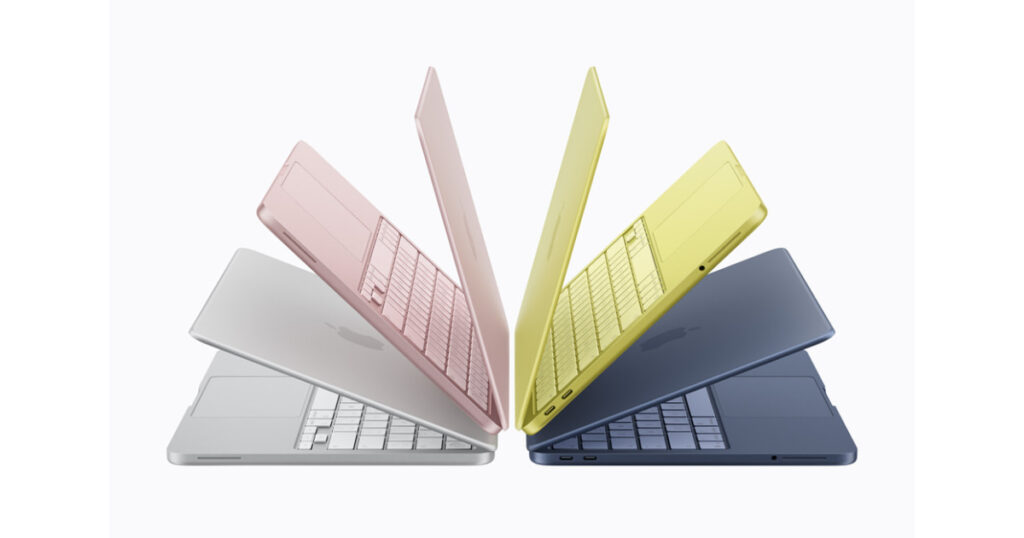
The MacBook Neo is Apple’s first genuinely new entry-level MacBook, not a discounted old model, but a machine designed from the ground up to launch at $599. It’s a 13-inch laptop in a full aluminum enclosure running macOS Tahoe, powered by Apple’s A18 Pro chip, and available in four colors: blush, citrus, indigo, and silver.
To understand why this matters, you need to understand Apple’s laptop lineup history. For years, Apple’s cheapest new laptop was the MacBook Air, priced at $1,099. Apple did sell refurbished M1 MacBook Airs through retailers like Walmart for under $700, but they never engineered a laptop to start below the four-figure mark, until now.
The MacBook Neo sits below the MacBook Air ($1,099 for M5) and well below the MacBook Pro ($1,599+), forming a three-tier lineup. It’s Apple’s direct answer to Chromebooks and budget Windows machines, targeting students, families, and first-time Mac buyers who’ve been priced out of the traditional Mac ecosystem.
Pre-orders opened March 4, 2026, with units shipping March 11. There are two configurations: $599 with 256GB storage (no Touch ID), and $699 with 512GB storage and Touch ID. There are no build-to-order RAM options. 8GB is the only memory configuration available.

MacBook Neo Specs: Full Technical Breakdown
| Component | MacBook Neo Spec |
|---|---|
| Chip | Apple A18 Pro: 6-core CPU (2 performance + 4 efficiency), 5-core GPU, 16-core Neural Engine |
| Memory | 8GB unified memory (fixed, no upgrade) |
| Memory Bandwidth | 60 GB/s |
| Storage | 256GB SSD ($599) or 512GB SSD ($699) |
| Display | 13.0-inch Liquid Retina IPS, 2408×1506 at 219 ppi, 500 nits, sRGB (1 billion colors) |
| Battery | 36.5 Wh, up to 16 hrs video streaming / 11 hrs wireless web |
| Charging | 20W USB-C adapter (no fast charge, no MagSafe) |
| Ports | One USB-C (USB 3, up to 10Gb/s + DisplayPort); one USB-C (USB 2, up to 480Mb/s); 3.5mm headphone jack |
| External Display | One display, up to 4K at 60Hz (no Thunderbolt) |
| Wi-Fi | Wi-Fi 6E (802.11ax) |
| Bluetooth | Bluetooth 6 |
| Camera | 1080p FaceTime HD (no Center Stage) |
| Audio | Dual side-firing speakers, dual-mic array (no Spatial Audio head tracking on AirPods) |
| Keyboard | Magic Keyboard: 78 keys, no backlight, color-matched. Base: no Touch ID. $699 model: Touch ID. |
| Trackpad | Multi-Touch mechanical click trackpad (no Force Touch) |
| Dimensions | 11.71 × 8.12 × 0.50 in / 2.7 lbs (1.23 kg) |
| Colors | Blush, Citrus, Indigo, Silver |
| Operating System | macOS Tahoe |
| Price | $599 (256GB) / $699 (512GB + Touch ID) / $499 education (256GB) |
A18 Pro Chip: What It Means vs Apple Silicon Macs
The A18 Pro is the chip Apple uses in the iPhone 16 Pro, a mobile chip, not the M-series silicon found in MacBooks. That distinction matters, but perhaps less than you’d expect.
Apple Silicon, whether A-series or M-series, shares the same underlying ARM architecture. The M-series chips are essentially scaled-up versions with more CPU cores, more GPU cores, and more memory bandwidth, but the fundamental design philosophy is the same. As AppleInsider observed, the A18 Pro uses the same performance and efficiency cores as the M4, just in smaller numbers.
Here’s how the chips compare using Geekbench 6 proxy data (A18 Pro from iPhone testing, M-series from MacBook results):
Geekbench 6: Single-Core Performance
⚠ These scores are estimates extrapolated from iPhone 16 Pro and existing Mac benchmarks. Independent MacBook Neo benchmarks will be available once units ship March 11. Figures should be treated as directional, not precise.
Geekbench 6: Multi-Core Performance
The multi-core gap between the Neo and the M5 Air is significant at roughly 2x, because the M5 has 10 CPU cores versus the A18 Pro’s 6. But for the vast majority of Neo buyers, this gap is invisible in daily use. Loading Chrome tabs, writing in Google Docs, streaming Netflix, or editing photos in Canva doesn’t require M5-level horsepower. Where the gap becomes real: rendering large video exports, running virtual machines, or working with complex spreadsheets simultaneously.
The GPU gap is larger. Geekbench Metal scores put the M5’s GPU at roughly 75,000 versus around 32,500 for the A18 Pro. For casual gaming and everyday graphics, the Neo is fine. For creative work in Final Cut, heavy photo editing in Lightroom with large RAW files, or serious 3D work, the M5 Air wins decisively.
Display: Liquid Retina at $599
The 13-inch Liquid Retina display is one of the Neo’s genuine strengths. At 219 ppi with 500 nits of brightness, it’s significantly sharper and brighter than anything in this price range from Windows manufacturers. Text is crisp, photos look good, and it holds up in moderately bright environments.
The important limitation is color gamut. The Neo covers sRGB, the standard color space used by most of the web, documents, and video content. What it doesn’t support is P3 Wide Color, the expanded gamut that the MacBook Air uses. For everyday content consumption and productivity, sRGB is perfectly fine. The difference becomes meaningful if you’re a photographer editing RAW files, a video editor working with HDR content, or a designer reviewing print-accurate colors.
There’s also no True Tone (the technology that adjusts white balance to match ambient light) and no ProMotion variable refresh rate (the Air doesn’t have that either, but it’s worth noting). The display does not support HDR output.
John Gruber’s hands-on at Daring Fireball noted the display “looks good and is just as bright as the Air’s, and it looks way better, way sharper, and way brighter than the criminally ugly displays on PC laptops in this price range.” That’s a fair summary. The Neo’s display competes with laptops at $800–$1,000 from Windows OEMs.

Memory, Storage & Connectivity: Every Limitation Explained
8GB unified memory, no upgrade.
This is the most discussed tradeoff. The A18 Pro chip as designed only supports 8GB. Apple has not offered a path to 16GB, and there are no build-to-order options. For browsing, document editing, email, video calls, and light multitasking, 8GB is workable with Apple’s efficient memory management. Where it becomes constrictive: keeping 20+ browser tabs open while running Zoom plus Slack plus a local AI model. macOS will page to the SSD more frequently, and you’ll notice occasional slowdowns with memory-intensive workflows.
The two USB-C ports are not equal.
This is Apple’s sneakiest cost-saving move and the most important spec to understand before buying. The left port is USB 3 (up to 10Gb/s) with DisplayPort 1.4 support: this is your “good” port for connecting displays, fast storage, or docking. The right port is USB 2, maxing out at 480Mb/s, roughly 20x slower. It charges fine but is effectively useless for data transfer or displays. There is no Thunderbolt on the Neo; you cannot connect Apple’s new Studio Display or use Thunderbolt docks.
No MagSafe.
Both ports charge the Neo, but neither is the magnetic MagSafe connector. The 20W included adapter is functional but slow. No fast charging means replenishing from low battery takes longer than the Air.
Real-World Performance: What the A18 Pro Means for Everyday Tasks
Apple claims the MacBook Neo is up to 50% faster for everyday tasks and up to 3x faster for on-device AI workloads compared to the best-selling PC with the latest Intel Core Ultra 5 chip. Those figures come from Apple’s own testing (using Speedometer 3.1 for browsing and AI photo-editing tasks), but they’re broadly consistent with what we’d expect given the Geekbench data.
In practical terms, the A18 Pro MacBook Neo should perform at approximately M1 MacBook Air levels for everyday tasks. That’s a meaningful reference point: the M1 Air, released in 2020, remains a highly capable machine for productivity in 2026. It handles modern browsers, office suites, communication apps, and light creative work without complaint. The Neo should be in the same tier, potentially slightly faster in some tasks due to the A18 Pro’s newer CPU architecture.
Because the A18 Pro was designed for the iPhone’s tight thermal constraints, it should run perfectly cool in a fanless laptop enclosure, one advantage the chip has over laptop-class Intel processors, which generate significantly more heat and require fan management that can cause throttling in thin chassis.
Apple Intelligence, the company’s on-device AI system for writing suggestions, photo editing tools, summarization, and notification management, runs fully on the A18 Pro’s 16-core Neural Engine. All Apple Intelligence features supported on iPhone 16 Pro work on the Neo, including Clean Up in Photos and writing tools in the systemwide text field. This is a meaningful distinction from the cheapest Windows AI laptops, which often struggle with on-device AI performance.
What the Neo Handles Well
Web browsing, streaming video, video calls (Zoom, FaceTime, Teams), writing and editing documents, email and calendar, photo editing in Apple Photos or basic Lightroom edits, light gaming, note-taking apps, Python scripting and light development, and running Apple Intelligence features, and all of these are well within the Neo’s comfort zone.
Where the Neo Will Struggle
Exporting long 4K video timelines, running Windows in Parallels or virtualization, professional color grading with large RAW files, complex 3D rendering, running multiple resource-intensive apps simultaneously, and any workflow that regularly requires more than 8GB of memory will push the Neo to its limits.
MacBook Neo vs MacBook Air: Which Should You Buy?
The MacBook Air M5 costs $1,099, which is $500 more than the base Neo. That’s not a small difference. Here’s the complete picture of what you gain and lose at each price point.
| Feature | MacBook Neo $599 / $699 |
MacBook Air M5 $1,099+ |
|---|---|---|
| Chip | A18 Pro (iPhone-class) | M5 (desktop-class) |
| CPU Cores | 6 (2P + 4E) | 10 (4P + 6E) |
| GPU Cores | 5-core | 10-core (starts) |
| RAM | 8GB only | 16GB–32GB |
| Base Storage | 256GB | 512GB |
| Display Size | 13.0 in | 13.6 in |
| Color Gamut | sRGB | P3 Wide Color |
| True Tone | No | Yes |
| Battery | 16 hrs (video) | 18 hrs (video) |
| MagSafe | No | Yes |
| Thunderbolt | No | Yes (2 ports) |
| USB Speed | USB 3 + USB 2 | Thunderbolt (both) |
| External Displays | 1 (up to 4K/60) | 2 displays + lid |
| Touch ID | $699 model only | Standard (all) |
| Keyboard Backlight | No | Yes |
| Force Touch Trackpad | No | Yes |
| Speaker System | Dual side-firing | 4-speaker stereo |
| Webcam | 1080p (no Center Stage) | 1080p + Center Stage |
| Wi-Fi | Wi-Fi 6E | Wi-Fi 7 |
| Fast Charging | No | Yes |
| Color Options | Blush, Citrus, Indigo, Silver | Sky Blue, Starlight, Midnight, Silver |
| Apple Intelligence | Full support | Full support |
| Starting Price | $599 | $1,099 |
| M5 MacBook Air data from Apple specs. Comparison based on entry-level configurations of each model. | ||
The 18 Tradeoffs Apple Made to Hit $599
Every cut Apple made serves a cost reduction purpose. Here’s the honest breakdown:
MacBook Neo vs Windows & Chromebook Rivals at $500–700
Apple explicitly positioned the MacBook Neo against Windows laptops and Chromebooks. Internally, Apple described the product as “incredible value,” believing it would drive significant switcher numbers. How does it actually compare?
| Feature | MacBook Neo $599 |
HP Laptop 14 ~$550 |
Acer Chromebook 516 GE ~$499–599 |
|---|---|---|---|
| Processor | Apple A18 Pro | Intel Core 5 | Intel Core i5 |
| RAM | 8GB | 8GB | 8GB |
| Storage | 256GB SSD | 256GB SSD | 256GB SSD |
| Display | Liquid Retina IPS, 219 ppi | 14-in 1080p, ~157 ppi | 16-in IPS 1080p, 135 ppi |
| Build Material | Aluminum | Plastic | Plastic |
| Battery Life | 16 hrs (Apple) | ~8–10 hrs | ~8–12 hrs |
| Weight | 2.7 lbs | ~3.8 lbs | ~4.4 lbs |
| CPU Perf (Single-Core) | ~3,428 GB6 | ~2,200 GB6 | ~2,000 GB6 |
| Gaming | Light (5-core GPU) | Modest (Intel Arc) | Light (Intel Iris) |
| Software Ecosystem | macOS Tahoe (full apps) | Windows 11 | ChromeOS (Android+Linux) |
| Apple Intelligence / AI | Full support | Copilot+ (variable) | Google Gemini (cloud) |
| 5-Year Longevity | Excellent (Apple Silicon) | Moderate | Moderate |
| Keyboard Backlight | No | Yes (most configs) | Yes |
| Ports | 2× USB-C | USB-A, USB-C, HDMI | USB-A, USB-C, HDMI |
| Touch Screen | No | Some configs | Yes |
| Max RAM | 8GB (fixed) | Up to 16GB | 8GB |
| iMessage, AirDrop, FaceTime | Full ecosystem | No | No |
| HP and Chromebook specs representative of typical configurations at comparable prices in early 2026. Geekbench scores are estimates for comparison purposes. | |||
The MacBook Neo’s advantages over Windows/Chromebook competition are concentrated in display quality, build materials, battery life, and performance efficiency. Its disadvantages are in port variety, upgradeability, and lack of a keyboard backlight, the latter being a surprisingly sore point given that many $300 Chromebooks include backlit keys.
John Gruber’s Daring Fireball review described Apple’s briefing side-by-side comparison with an HP 14-inch as striking: the MacBook Neo’s display looks dramatically better, the build quality difference from aluminum vs plastic is immediately apparent, and the performance advantage in everyday tasks is real. The Neo doesn’t win on paper spec-for-spec, but in everyday usability it competes well above its price tier.
For someone switching from a Chromebook specifically, the experience shift is significant: full desktop-class software (not Android app ports), a proper macOS ecosystem, Continuity Camera, AirDrop, and iMessage on desktop. For Windows users, the primary friction is software compatibility, and if your workflow depends on Windows-only applications, macOS isn’t a simple replacement.
Who Should Buy the MacBook Neo?
The MacBook Neo’s education price of $499 makes it among the most compelling laptop deals in memory. It handles every academic workload: note-taking, research, essay writing, presentations, coding courses, and video consumption, all without strain, and its all-day battery removes outlet anxiety from the equation.
- $499 with Apple education discount
- Apple Intelligence writing tools built in
- All-day battery for back-to-back lectures
- Lighter than most school laptops at 2.7 lbs
- No keyboard backlight is the biggest practical limitation for late-night study
Apple’s internal data shows nearly half of Mac buyers are new to the platform. The Neo gives switchers full macOS at the lowest price Apple has ever offered for a new Mac laptop. The software adjustment is real, but it can be done without a $1,000+ commitment.
- Full macOS, the same software as the MacBook Air and Pro
- Apple ecosystem integration: AirDrop, iMessage, Handoff
- Smaller financial risk for trying macOS
- If you’re deeply invested in Windows-only software, check compatibility first
The Neo is an excellent family laptop, a secondary machine for travel, or a shared household computer. Its durability (aluminum build), long battery life, and reliable macOS security model make it a smart “just works” purchase without over-investing.
- Aluminum build survives daily handling better than plastic laptops
- macOS malware risk is historically lower than Windows
- Parental controls built into macOS
- No backlight and base-model’s lack of Touch ID are minor concerns for shared use
If your work involves video editing, professional photography, music production, software development with multiple environments, or heavy multitasking across resource-intensive apps, the Neo’s 8GB ceiling will frustrate you within months. The MacBook Air M5 at $1,099 is the right answer.
- M5 delivers 2× multi-core and 2× GPU performance
- 16GB RAM standard, upgradeable to 32GB
- Thunderbolt ports, Studio Display compatibility, dual external displays
- P3 Wide Color for professional photography/video work
- Will remain capable for longer, with better 5-year longevity
Designers, photographers, and video editors who need accurate P3 color, the ability to connect multiple displays, or Thunderbolt accessories should go straight to the Air. The Neo’s sRGB display and single USB 3 port create real workflow limitations for these users.
- P3 Wide Color for accurate design and photography work
- Two Thunderbolt ports for dock + display setups
- Supports 2 external displays simultaneously (plus lid display)
MacBook Neo Colors: Which Should You Choose?
The Neo arrives in four colors, each more saturated and distinctive than the MacBook Air’s palette. Apple’s choice of vivid colors is strategic: the Neo is aimed at a younger demographic, and the Air’s existing Sky Blue, Starlight, and Midnight options skew more conservative.
One subtle distinction: the Neo’s keyboard and bottom feet are color-matched to the lid: Blush gets pink keys, Citrus gets yellow keys. The MacBook Air uses a black keyboard regardless of color. The Apple logo on the Neo’s lid is also matte rather than the shiny logo on previous MacBooks, a minor but distinctive detail.
All four colors are available at both the $599 and $699 price points. Color does not affect performance or specifications.
FAQ: MacBook Neo Answered
Can you upgrade the RAM in the MacBook Neo?
No. The A18 Pro chip is configured with 8GB of unified memory, and there is no upgrade path, neither at purchase nor after. This is a fixed hardware limitation, not a software restriction. If 8GB is likely to be insufficient for your workflows, consider the MacBook Air M5, which starts with 16GB.
Does the MacBook Neo support Apple Intelligence?
Yes, fully. The A18 Pro includes the same 16-core Neural Engine that powers Apple Intelligence on iPhone 16 Pro. All Apple Intelligence features available on macOS Tahoe are supported: writing tools, Clean Up in Photos, Smart Reply, priority notifications, and more. On-device processing means your data doesn’t leave the device for these features.
Can the MacBook Neo connect to an external monitor?
Yes, one external monitor, up to 4K at 60Hz, using the USB 3 port (the left port). It does not support Thunderbolt, so Apple’s new Studio Display models are not compatible with the Neo. You can extend your desktop with one monitor while simultaneously using the built-in display. USB-C to DisplayPort or HDMI adapters work for this connection.
Why is the base model missing Touch ID?
Apple omitted Touch ID from the $599 base model as a cost-reduction measure. If you own an Apple Watch, you can use it to unlock the Mac and authenticate Apple Pay, a partial workaround. The $699 model includes Touch ID on the keyboard. Given the increasing use of passkeys and Apple Pay, Touch ID is more valuable now than it was a few years ago, and the $100 step-up to the 512GB model with Touch ID is worth considering for most buyers.
How does the MacBook Neo compare to the M1 MacBook Air?
The A18 Pro in the Neo has roughly comparable single-core performance to the M1, with slightly higher multi-core performance thanks to a newer architecture. Both are more than adequate for everyday tasks. The Neo has a newer Neural Engine for Apple Intelligence (which M1 doesn’t support), but the M1 Air has MagSafe, a backlit keyboard, Thunderbolt, and a slightly larger display. For most buyers in 2026, the Neo is the better new purchase; the M1 Air’s advantage is second-hand availability at lower prices.
Is the MacBook Neo good for gaming?
Light gaming (casual titles, indie games, older AAA titles on medium settings) is within the Neo’s reach. The 5-core GPU can handle games available through the App Store and titles that have been ported to Apple Silicon via the Game Porting Toolkit. For dedicated gaming, neither the Neo nor any MacBook is the right tool; a Windows gaming laptop delivers far better GPU performance per dollar. The Neo is not a gaming machine, but it can handle gaming on the side.
When does the MacBook Neo ship?
Pre-orders opened March 4, 2026. Units ship starting March 11, 2026. The Neo is available through Apple’s website, Apple Stores, and authorized retailers.
Is the MacBook Neo good for college students?
Yes, strongly. At $499 with education pricing, the Neo undercuts most comparable Windows laptops while offering a better display, longer battery life, and full macOS. It handles every typical academic workload: writing, research, spreadsheets, presentations, coding coursework, and video calls, all without issue. The lack of a keyboard backlight is the most practical daily limitation for study sessions in dimly lit environments.
Can the MacBook Neo run Windows?
Not natively. The A18 Pro is an ARM chip that runs macOS; Boot Camp is not available. Virtualization options like Parallels can run Windows on ARM, but this requires an additional purchase and places extra demand on the 8GB of memory. For users who need occasional Windows access, this is a workable solution. For users who need Windows as a primary environment, a Windows machine is the more practical choice.
Verdict: Is the $599 MacBook Neo Worth It?
The MacBook Neo is Apple executing its playbook at a new price point, and it works. At $599, you’re getting a machine with a genuinely excellent display, premium build materials, competitive performance, and 16 hours of battery life. These are specs that Windows manufacturers charge $800–$1,000 to match. The A18 Pro isn’t M5-class silicon, but it’s more than sufficient for the overwhelming majority of tasks the Neo’s target audience will actually use it for.
The honest caveats are real: 8GB of RAM with no upgrade path defines a ceiling you’ll hit sooner or later. The missing keyboard backlight is a surprising omission for a laptop in 2026. The USB 2.0 right port is a trap for anyone moving large files. And if you’re a professional who needs accurate color, Thunderbolt, or more than one external display, the MacBook Air is the right answer, full stop.
But for students, families, first-time Mac buyers, and anyone who’s been waiting for Apple to make Mac accessible without compromise, the MacBook Neo is the answer to a question Apple took far too long to answer.
- Breakthrough $599 price for a new Mac
- Excellent display for the price tier
- Premium aluminum build
- 16-hour battery life
- Full Apple Intelligence support
- Fanless, silent operation
- $499 education pricing
- Full macOS ecosystem
- Four distinctive colors
- 8GB RAM with no upgrade path
- No keyboard backlight
- One USB 2.0 port (very slow)
- No Thunderbolt, no MagSafe
- sRGB only (no P3 Wide Color)
- No Touch ID on base model
- No fast charging
- One external display only






[…] original AirPods Max used an H1 chip in each ear cup (two H1 chips total). The H2 delivers more processing power per chip and, […]
[…] move marks a significant turning point for the company. Historically, the Mac Mini was the affordable gateway into the world of MacOS. By removing the lowest-priced option, Apple […]