
What I learned about the Microsoft Advertising ecosystem at the growth webinar

I recently covered the “Unlock new growth with Microsoft Advertising” webinar for my blog. I joined the session with a simple view of the platform. I knew it existed, I had heard people mention it, but I had never spent real time exploring it. In my head it was the ad platform you think about after Google, and only if you have budget left over.
By the end of the session, that view had shifted a little. Not completely, and I will be honest about where I still have questions. But the Microsoft Advertising ecosystem turned out to be a much wider thing than I expected, and I think it deserves a fair look from anyone who runs paid campaigns.
In this post I will walk you through what the hosts covered, what stood out to me, what I would like to verify, and how I would approach a first test if I were running ads myself.
How the webinar was set up
The presentation was built around three myths that the hosts wanted to bust:
“It’s just Bing.”
“It’s not my audience.”
“It’s too much work.”
I liked this structure. Most of us carry at least one of these thoughts about a new ad channel, so the format felt relatable from the first slide. The hosts, who work in new business and growth at Microsoft, went through the ecosystem first, then the audience, then what is new and how to get started. The session ended with a Q&A and an offer for new advertisers.
Let me take the myths one at a time, because that is also how my own thinking moved during the session.
Myth one: the Microsoft Advertising ecosystem is more than Bing
The line that stayed with me from this section was simple: Bing is the front door, and the whole ecosystem is the house.
I had honestly thought of Bing as the whole story. If someone told me they were advertising on Microsoft, I would picture a search results page and nothing else. The deck showed something different. Ads can appear across Edge, Outlook, MSN, LinkedIn, Xbox, Windows and Copilot. Microsoft puts the total at more than one billion unique users across the Microsoft Advertising ecosystem.
Here are the numbers that were shown on the slides:
- Bing reaches about 600 million people every month.
- Edge is the second largest desktop browser.
- MSN is the number one desktop news service, with more than 550 million monthly readers.
- Outlook is the second largest mail service, with more than 190 million monthly users.
- LinkedIn has more than 1.2 billion members.
- Copilot has more than 140 million daily active users.
- Xbox and casual games reach more than 500 million monthly players, and Solitaire was described as the most played video game of all time.
There was also a slide on search market share. In the United States, Microsoft’s share of PC search is 38%, with about 7.5 billion monthly searches. Worldwide, the figure is 18.3% and 14.7 billion monthly searches. The source on that slide is comScore, from March 2025, and it covers PC only. I mention that because the detail matters when you quote a share number.
After reading through the list, the “front door” idea finally made sense to me. Your customer may never see your ad while searching. They might see it while checking email in the morning, reading the news at lunch, or playing a quick game on a break.
Ad formats that go beyond search
The session also threw light on the formats available. These include search ads, vertical ads, native ads, display ads, video ads, connected TV ads and Performance Max. That is a wide menu. It confirmed for me that the platform is set up to support goals across the funnel, from awareness at the top to conversions at the bottom.
I want to be clear that a wide menu does not mean every format will work for every business. But for someone who assumed it was only search ads, the range was a genuine surprise.
A look at the customer journey across Microsoft products
One of my favourite sections of the webcast was when we followed a single person through a normal day. She opens Outlook to check for client emails. On the way to the office her shoes hurt, so she asks Copilot what the best work shoes are for walking in New York. Later she searches Bing to compare two shoe brands. At lunch she plays Candy Crush. In the evening she plays Xbox, watches baseball and browses recipes on MSN.
Every step in that day happens on a Microsoft product. I liked this portion of the webcast because it showed the point better than a statistic could. It made me think about my own day. I check my email, read the news, open a browser and search for things, and a lot of that already sits inside Microsoft products without me thinking about it.
There was also a small poll during the session. The average person has 11.5 browser tabs open during the day, and about 5 of them are personal. That made the room laugh, and it also made the point that work and personal life share the same screen.
Myth two: the Microsoft Advertising audience is not my audience
This was the section where I had the most questions, and I think that is genuinely healthy to be honest.
The presenters revealed that Microsoft Advertising reaches people you cannot reach elsewhere. It used US data from Comscore, dated March 2026, to show how many people on Microsoft properties are not on other big platforms. According to the slide, about 46 million are not on Google Search, 67 million are not on Facebook, 37 million are not on Amazon, 112 million are not on Instagram and 168 million are not on Pinterest.
I find that interesting. If the numbers hold, it means a real group of people is being missed by advertisers who only use one or two channels. That is the heart of the argument for adding a second platform. Still, a claim like this depends on how the overlap was measured, so I would want to look at the Comscore data myself before building a plan on it. I am not saying the figure is wrong. I am saying I would want to see the method, and I think you would too.
Work and life share the same browser
The idea that landed best for me was that work and personal life share the same browser. A Workday shopper study from June 2026 was cited, saying 87% of people browse for products on a work device and 63% add items to their cart.
I found this believable, but also a bit surprising. I can picture it easily. I have looked at products on my work laptop more times than I would like to admit. What surprised me was the size of the numbers. I would treat them as a strong signal about behaviour, and I would still check how well they fit my own readers. The idea also fits the work and life share the same browser point the hosts kept returning to: if people shop during the workday, then workday platforms like Outlook, Edge and Windows become useful places to show ads.
What the audience data says
The deck also shared a few points about people who use Microsoft properties. They are described as 48% more likely to be high income, 25% more likely to add to cart and 16% higher in online spend. These figures come from GWI Core, Comscore and Microsoft internal data, and I have marked the GWI data for you to link. There was also a note that people spend more than four hours a day on Windows devices, and that Windows runs on more than a billion active devices.
There was also a demographics slide, but I found two different sets of numbers for it in the file I received, so I decided not to quote it. I would rather leave a number out than share one I cannot confirm.
Targeting tools
On the targeting side, we were showed a set of tools that mix Microsoft data with your own first-party data. Microsoft data includes in-market audiences, LinkedIn profile targeting, age and gender, location, device and predictive targeting. Your own data can be used through remarketing, dynamic remarketing, custom audiences and customer match. Some of these need the UET tag, which I will come back to.
For me, LinkedIn profile targeting is one of the most interesting items on that list. Being able to reach people by job-related details, inside a platform you may already use for search, is something I had not thought about before.
Copilot and Edge were the parts I kept thinking about
If you asked me which part of the ecosystem stood out most, I would say Copilot and Edge.
The reason is simple. Search is changing. The deck described how people now mix classic searching with conversations with an AI assistant. They ask Copilot to explore an idea, use search to check details, look at reviews, compare options and then buy. Microsoft owns the browser and the assistant, so it sits in a strong spot to see that whole path.
The speakers also touched upon what Microsoft calls anticipation-based marketing. In the past, marketing was a straight line of messages and clicks. Today, AI helps tailor experiences, but people still need to seek, click and choose. In the future, it is safe to assume that, intelligent systems may predict needs and start conversations on their own. I cannot say how fast that will happen. But I do think the direction is clear, and Edge and Copilot are where it will play out for this platform.
Ads in Copilot: curious, and a little cautious
Microsoft says ads in Copilot are built around three ideas. Copilot’s organic answers are never influenced by sponsored content. Sponsored content is clearly separate from the organic answer. And sponsored content only appears when it is highly relevant and comes from trusted sources.
The example showed someone asking for outfit ideas for an early 2000s themed party. Copilot gave a normal answer. Below it, a labelled sponsored block showed dresses from brands that matched the request. The design looked clean, and the tone of the ad connected to the conversation.
I understand the pitch, and I can see why advertisers would be excited. A person who has just described exactly what they need is very ready to hear about a product.
At the same time, I feel a little uneasy. When I ask an AI assistant a question, I want to trust the answer, and I want to know exactly where the answer ends and the ad begins. Microsoft says that line is clear. I believe it is the intention, and I would like to see it in day-to-day use before I feel fully relaxed about it. I think many readers will feel the same, and that is a fair thing for advertisers to keep in mind when writing ads for this space. Ads that respect the conversation will probably do better than ads that interrupt it.
The performance numbers were strong on paper. Microsoft reports a 53% rise in purchases after a Copilot interaction, and a 194% rise when the chat had shopping intent. The fine print is worth reading, though. The data covers a short period in late December 2024, includes only Edge users, and measures purchases based on assumptions from the URL address. So I see it as an encouraging hint about behaviour, not a promise about what your own campaigns will achieve.
Performance Max and search together
The panel also claimed that adding Performance Max to search ads brings in conversions that search alone cannot capture. The reported averages were a 3x increase in return on ad spend and a 32% drop in cost per acquisition compared with search-only exposure.
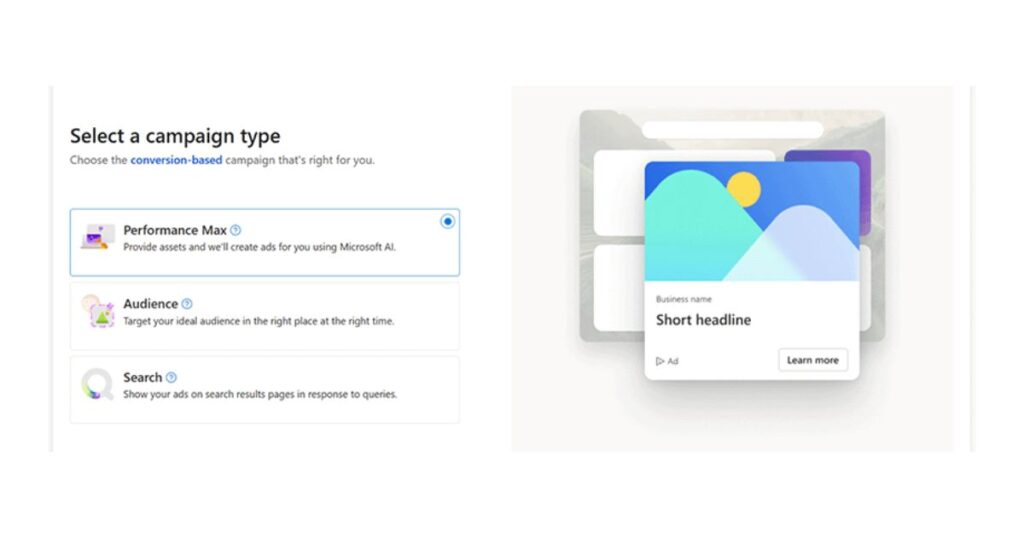
I was interested in this one. The idea makes sense to me. Search catches people who are already looking, and Performance Max spreads your reach across the other surfaces in the ecosystem. The hosts described it as you setting the strategy with goals, assets and signals, and the AI creating and optimizing ads across all Microsoft Advertising surfaces.
The numbers come from Microsoft’s own internal data from May and June 2024. That is useful, and I would love to see an independent test alongside it. Until then, I read it as a good reason to try Performance Max in my own account and measure it with my own numbers.
Myth three: is it really too much work?
This was the myth I was most curious about, because time is the thing most of us are short of.
The answer we got to was a three step one –
- Import your existing campaigns from Google or Meta, so you do not start from scratch.
- Set up your UET tag, which handles conversion tracking.
- Launch, give the campaigns a few weeks to learn and run, then use Copilot inside the platform for optimization.
On paper, that is simple, and I like that the option to import Google Ads campaigns exists. It removes the blank page problem, which is often the biggest barrier to starting.
In practice, I still think it would feel like extra work, and I want to be fair about that. Anyone who has run paid campaigns knows that importing is the start, not the finish. You still need to check budgets, review the imported settings, test tracking, and keep an eye on results.
One more channel means one more dashboard, and my time is limited. I do not say this as a criticism of the platform. It is just how any new channel works.
Copilot tools that may save time
Next, we were introduced to four Copilot features that could help with that workload:
- Copilot asset creation through the API, which lets advertisers create creative assets at scale.
- Natural language custom reports, where you describe the report you want in plain words.
- Ad Studio, where Copilot follows your brand kit and voice.
- Diagnostics and optimization, where Copilot helps find the cause of changes in bidding, creative and performance.
If these tools work as described, they could ease a lot of the routine work. I cannot judge that until I try them, and I think that is the right way to approach it.
Customer stories worth reading
The use cases did do a great job of giving us a real time benchmark to demonstrate the above:
- Lululemon reported 3.3x higher revenue after using high-impact media to reach new customers.
- GroupM and TUI Cruises saw 54,000 interactions tied to connected TV ads.
- Club Med reported a cost per booking that was two times lower after using Audience ads with in-market audiences.
These are good examples of different goals: reach, relevance and results. They come from well-known brands with big budgets, so I was left wondering what a similar story would look like for a small or mid-sized business. That is where I would love to see more from Microsoft in the future.
Where I wanted more detail
I want to keep this section constructive, because the session had real value and the hosts were clear and friendly.
The area where I wanted more was setup and cost detail. There was a lot of information on reach, audience and results. I would have liked to hear more about what a small advertiser should expect to spend, how the first few weeks usually go, and what mistakes new advertisers tend to make when they import campaigns.
A short walkthrough of the account, or a small business example, would have made the practical side easier to picture.
Since the session ended with an offer of a free strategy session and a custom launch incentive for new advertisers, I suspect those questions are best answered there. The offer is for advertisers who are new to Microsoft Advertising, and the consultation is subject to eligibility. If you are curious, that might be a low-pressure way to get your cost and setup questions answered by someone who knows the platform.
My verdict on the Microsoft Advertising ecosystem
So, where do I land?
I think the Microsoft Advertising ecosystem deserves attention. It is much bigger than Bing, the Microsoft Advertising audience story is more interesting than I expected, and the mix of Edge, Copilot and Outlook gives advertisers ways to reach people that other platforms do not offer in the same combination.
Do I think you should move a large part of your budget there right away? No. I would start with a small test, and here is how I would do it:
- Import your Google Ads campaigns instead of building new ones. It saves time and gives you a fair comparison.
- Set up the UET tag on day one. Without conversion tracking, you will not know what worked.
- Use a small budget. Pick an amount you are comfortable losing if the test does not work.
- Give it a few weeks. The campaigns need time to learn, as the hosts said.
- Judge it against your own numbers, not the numbers on a slide.
- Try Performance Max alongside search once your search campaigns are stable, and see whether it adds conversions you were missing.
- Watch ads in Copilot as they develop, and think about how your message would feel inside a conversation.
If the test works, scale it slowly. If it does not, you have lost very little and learned something useful about where your customers are. To me, that is the honest way to treat any new channel.
I went into this webinar with a narrow view and came out with a wider one. That alone made it worth my time.





[…] this announcement. It says the chip will power its own products and its wider AI portfolio. Check Microsoft’s official channels for […]