
One UI 9 explained: new Galaxy features for capture, AI and security

One UI 9 is Samsung’s latest software layer for Galaxy devices, built to make everyday tasks like filming, planning, translating and staying safe take fewer steps. It first arrived on the Galaxy Z Fold8 Ultra, Galaxy Z Fold8 and Galaxy Z Flip8. The rollout then expanded to the Galaxy S26, S26+ and S26 Ultra. This guide explains what changed, why each change matters in daily use, and how the pieces fit together.
Key takeaways
- One UI 9 focuses on three areas: capturing moments, personalising information, and managing device care.
- Galaxy AI becomes more context aware through Now Nudge, Creative Studio, Interpreter and Voice Recorder.
- Security and privacy get more visible through Security Brief, Privacy Alerts and a wider Scam Detection rollout.
- Some features depend on your device, region and language, so availability can differ.
Why the One UI 9 update matters
A software update rarely feels exciting until it removes a small annoyance you deal with every day. Most of the One UI 9 update is built around that idea. Instead of adding one big headline tool, Samsung improved many small moments: editing a shaky video, checking a warranty, finding a restaurant booking inside a chat, or scanning a curved page from a book.
The release also shows where Galaxy AI is heading. Earlier AI features often asked you to open a specific tool first. In One UI 9, more of the help appears where you already are, such as a text conversation or your daily summary.
One UI 9 features for capturing moments
My FanCam keeps the right person in focus
My FanCam tracks a person you select in a recorded video and keeps them centred. As the scene moves, it reframes the footage on its own. Think of a child on a school stage, a friend on a dance floor or a player during a match. Normally you would need to crop and reframe by hand afterwards. Here, the phone does that work so the clip is closer to ready for social sharing.
Document Scan handles awkward paper
Document Scan can now digitise curved book pages and corner-folded papers with less manual adjustment. Large-screen views on compatible Galaxy devices give you more room to check the result, and an improved Finger Eraser helps clean up marks and shadows. This suits students, office workers and anyone who scans receipts, notes or library pages.
Voice Recorder summaries are easier to scan
Voice Recorder now presents summaries in a more structured format. It uses headings and tables so the key points are visible at a glance. For a long meeting or lecture, this means less scrolling and less rereading.
Personalise your day with Now Brief in One UI 9
Generative and Editable Cards
Now Brief is the daily summary screen on Galaxy devices. With One UI 9, the new Generative and Editable Cards let you choose what appears in it. You can create cards across health, weather and video. The result is a brief that reflects what you care about, instead of a fixed layout that treats every user the same.
Security Brief inside Now Brief
Now Brief also becomes a place for security updates. Security Brief shows alerts for malware, apps from unknown sources and unnecessary permissions. Putting these alerts in a screen you already open daily makes it more likely that you will notice a problem early and decide whether action is needed.
Warranty and Care in Settings
Warranty and Care moves device support into the Settings menu. You can check warranty coverage across your connected mobile devices, run self-diagnostics and view repair estimates. You can also manage Samsung Care+ or book a service appointment in a few taps. Previously, this kind of task often meant searching for the right website or app.
Galaxy AI in One UI 9 works inside your daily tasks
Now Nudge offers help at the right moment
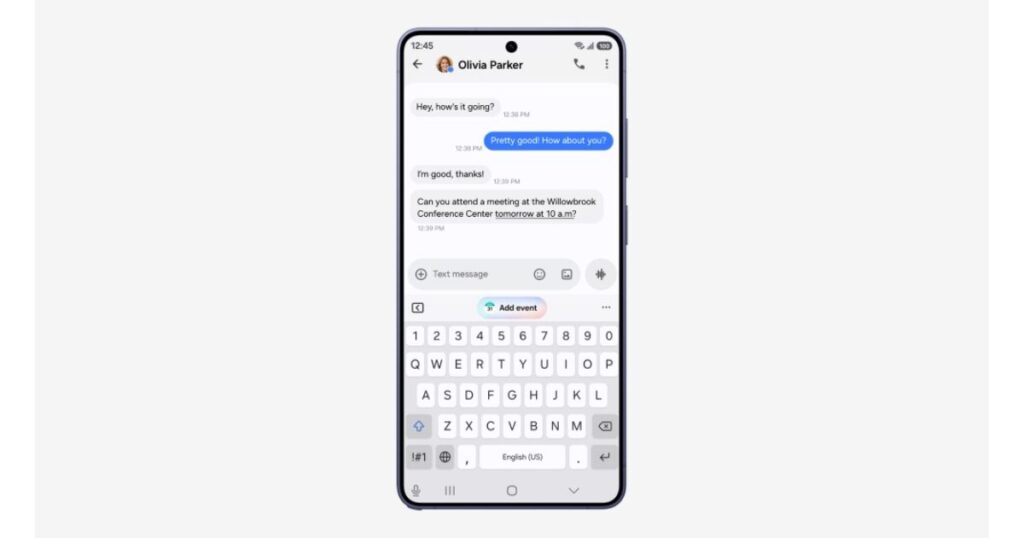
Now Nudge surfaces timely, context-aware suggestions across more parts of the Galaxy experience. If you are making plans over text, you can pull up reservation details or save a shared location without leaving the conversation. The benefit is simple: you stay in the flow of what you were doing.
Creative Studio suggests ideas based on events
Creative Studio now suggests image-generation ideas tied to upcoming events. If a friend’s birthday is close, you may see a prompt to create a themed image or greeting. It turns a reminder into a small creative act.
Interpreter makes translated chats easier to follow
Interpreter adds a Thread View so you can look back at earlier exchanges in a translated conversation. Translation in Conversation Mode is faster, and playback is quicker with compatible Galaxy Buds. Both changes reduce awkward pauses, which is what makes translated talk feel stiff.
Security and privacy in One UI 9
Privacy Alerts use on-device AI
Privacy Alerts use on-device AI to spot possible privacy risks. This includes unnecessary attempts to access permissions in the background. Running on the device means the checking happens on your phone. The feature gives you a clearer view of how your information is being accessed.
Scam Detection reaches more users
Scam Detection expands to additional countries and languages. It aims to protect Galaxy users from potential scam calls in supported markets. Scam calls affect people of every age, so wider language support matters in practice.
Together, Security Brief, Privacy Alerts and Scam Detection follow the same approach: give you clear information and let you decide what to do.
Which Galaxy devices get One UI 9?
One UI 9 debuted on the Galaxy Z Fold8 Ultra, Galaxy Z Fold8 and Galaxy Z Flip8. It then began rolling out to the Galaxy S26, S26+ and S26 Ultra. Samsung’s release notes attach conditions to several features, so timing and availability can vary by device, region, language and connected accessories. Check your own phone’s software update screen and Samsung’s official feature notes before expecting a specific tool.