Boox Go 6 Gen II: Stylus support is great, but the price is the real story

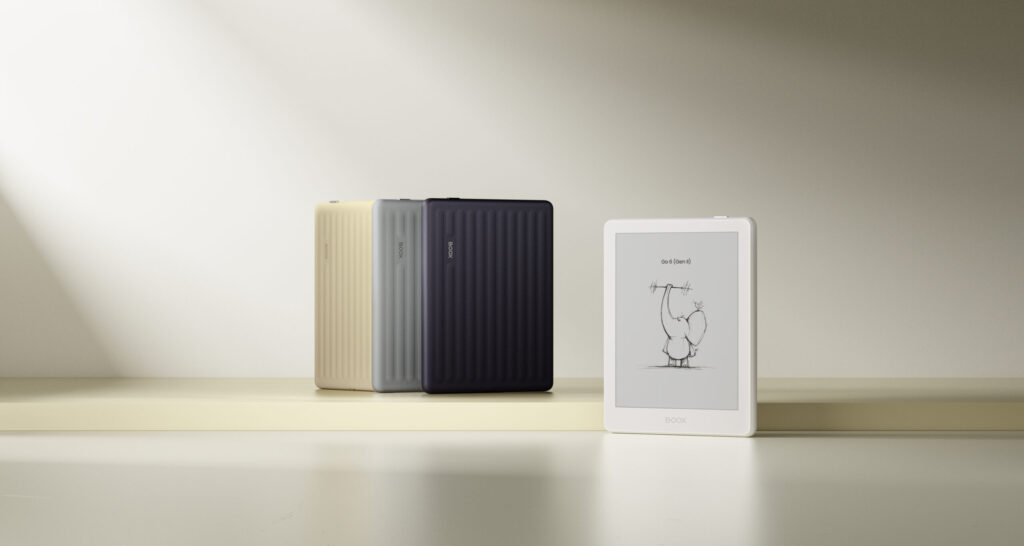
Boox has just announced the Go 6 Gen II, the second generation of its smallest Android ereader, and the headline feature is stylus support. For a 6-inch device that fits in a jacket pocket, that is a bigger deal than it might sound at first. But after looking past the announcement and into the actual numbers, I think the real story here is not the stylus. It is the price.
Let me walk you through why.
Stylus support on the Boox Go 6 Gen II is the right move
Here is something that anyone who carries a small notebook around will understand. Sometimes you do not want a full tablet. You want something small enough to grab on your way out the door, but useful enough to jot down a thought, mark up a PDF, or sign a document.
That is exactly the gap the Boox Go 6 Gen II is stepping into. The device now supports the InkSense Plus stylus, which means you can write directly on the screen, sketch quick diagrams, or take handwritten notes alongside whatever you are reading. The stylus itself supports 4096 pressure levels and charges over USB-C, so it is not some basic plastic stick. It has a side button and replaceable tips too.
Think about a student sitting in a lecture. Instead of carrying a laptop, a tablet, and a separate notebook, they could carry one small device that reads their textbooks and lets them scribble notes in the margins, just like they would on paper. Or imagine you are reading a contract and want to circle a clause and write a quick note to yourself before sending it back. That is the kind of everyday moment where stylus support on a small ereader genuinely earns its place.
This is a smart move from Boox. A 6-inch screen is not going to replace a full notepad for long writing sessions, but for quick notes, annotations, and sketches, it is more than capable. The fact that Boox brought this feature down to its smallest device, rather than keeping it reserved for bigger and pricier tablets, deserves credit.
The Android 11 debate is mostly noise
If you have been reading about the Go 6 Gen II online, you have probably seen people complaining that it runs Android 11, an operating system from 2020, while most of Boox’s other devices run Android 15.
On the surface, that sounds bad. Nobody wants to feel like they are buying outdated tech. But here is the thing. Most people buying a small Android ereader like this are not using it the way they use their phone.
Think about how you actually use an ereader. You open a book or a PDF, you read, you take a note here and there, maybe you check the time. You are not scrolling through five different social media apps, juggling notifications, or running the newest version of a game. The operating system version matters far more on a device where you are constantly switching between demanding apps. On an ereader, the experience is shaped much more by the screen, the battery life, and how the company has customised the software for reading and writing.
Boox has spent years building its own reading and note-taking software on top of Android, and that layer is what most users will actually interact with every day. Unless you are someone who specifically wants to run the newest Android apps on your ereader, which is a fairly niche use case to begin with, the Android 11 versus Android 15 debate is unlikely to affect your day to day experience.
So while I understand why tech enthusiasts are raising an eyebrow at this, I think most buyers will simply never notice or care. The bigger questions are about what you actually do with the device, not which version number is written in the settings menu.
The price is where Boox Go 6 Gen II gets a tough sell
The Boox Go 6 Gen II is priced at $199.99. Compared to the original Go 6, that is roughly a $50 increase. For that extra money, you get one additional gigabyte of RAM, taking it from 2GB to 3GB, a slightly redesigned body in new colours, and stylus support.
But here is the catch. The stylus itself is not included. The InkSense Plus stylus costs around $45 separately, or you can get a bundle with the stylus for $232.99. So if you actually want to use the headline feature that this new version is built around, you are looking at close to $245 in total.
Let’s put that in perspective. $50 more for 1GB of extra RAM is already a noticeable jump for what sounds like a small spec bump. Add the cost of the stylus on top, and you are paying significantly more than the original Go 6 for a device that, on paper, looks similar apart from these two changes.
I want to be fair here. The extra RAM genuinely matters if you like to multitask between apps, and stylus support is a real feature, not just a marketing checkbox. But when you add it all up, this starts to feel less like a small refinement and more like Boox testing how much people are willing to pay for incremental upgrades.
If you are someone who specifically wants handwriting and annotation on a tiny ereader, and you are comparing this to bigger, more expensive Boox tablets, the Go 6 Gen II might still come out as the more affordable choice in that category. But if you already own the original Go 6 and are wondering whether to upgrade, or if you are comparing this against other small ereaders that do not charge extra for a stylus, the value here gets harder to justify.
The bottom line
The Boox Go 6 Gen II gets one big thing right. Bringing stylus support to its smallest ereader is a genuinely useful step, and it opens up real use cases for students, professionals, and anyone who likes writing notes by hand. The Android 11 debate, despite all the noise around it, is unlikely to matter to most people who simply want to read and take notes.
But the pricing is where I think Boox needs to do better. Charging $50 more for a modest RAM bump, and then asking buyers to spend an extra $45 to actually use the feature the whole upgrade is built around, is a tough sell. It works out to a meaningful jump in cost for what looks like an incremental upgrade on paper.
If you have been waiting for a pocket-sized ereader with stylus support, the Go 6 Gen II is worth keeping an eye on. Just go in with your eyes open about what you are actually paying for, and what it will cost to get the full experience.