Google gradient icon redesign is here and it is changing Gmail, Drive, Calendar and more forever

Google gradient icon redesign is (finally) here
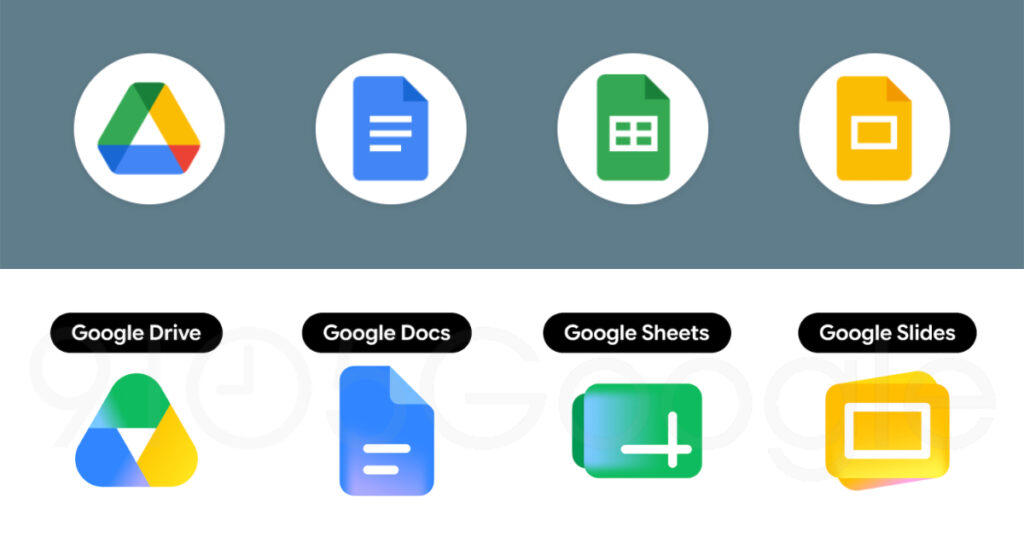
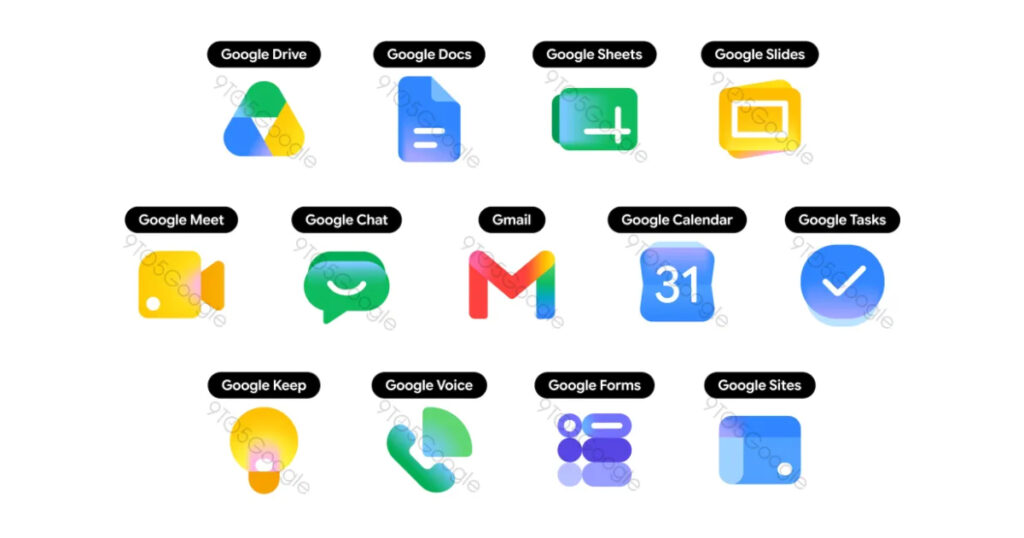
You have probably noticed something quietly changing on your phone or browser tabs over the past several months. Google has been steadily updating the icons across its apps, swapping out the flat, boxy, four-colour designs that have defined its look since 2020 for something richer, softer, and more expressive. And now, according to 9to5Google, that overhaul is going all the way. Every Google Workspace app is getting the gradient treatment, and the changes to Gmail, Calendar, Drive, Meet, Chat, Sheets, Slides, and more are far more dramatic than a simple coat of paint.
This is the biggest visual refresh Google has done in years, and it says a lot more about where the company is headed than most people might realise.
Why Google is changing its icons now
To understand why this redesign matters, you have to go back to 2020, when Google introduced its unified four-colour icon system. The idea was straightforward: make every Google app look like it belongs to the same family by working all four brand colours, blue, red, yellow, and green, into every icon.
The goal was cohesion. However, the result was a usability nightmare for many. Because every icon shared the same four colours and similar hollow shapes, they became notoriously difficult to distinguish at a glance in a crowded browser tab or taskbar.
That criticism stuck around for years, and Google has finally decided to do something about it. The 2026 gradient era is a direct response to this criticism. Google is prioritising distinctiveness by allowing each app to reclaim a “hero” colour. While the four-colour palette still exists within the ecosystem, the mandate to cram all four into every single icon is gone.
There are two overarching themes at play. The gradient effect found in the Google G, Gemini, Home, Photos, and Maps is present throughout to reflect the presence of AI-powered features. Google is also addressing a major criticism of the previous icon set by making everything more distinct in terms of colour and shape.
The page container has also been removed for most apps to allow for larger, more unique icons. In practical terms, this means each app now has more visual space to express its own identity rather than being squeezed into a shared template.
The AI connection hiding in plain sight
By using gradient colour designs for its app icons, Google is signalling an important development: the ever-expanding use of AI within its apps. The gradient style is directly associated with Gemini’s visual identity, and its presence across every Workspace icon is Google’s way of making that connection visible without saying it out loud.
Google Photos rolled out its gradient icon redesign in November 2025. Google Home followed shortly after. Google Maps completed the refresh in early March 2026. Each update followed the same quiet pattern with no press conference and a gradual rollout across devices. The Workspace overhaul is now the biggest wave yet in what has been a carefully staged, months-long visual transition.
Every app that is getting a new icon, broken down
Here is what is actually changing for each Google app, based on what 9to5Google has reported.
Gmail
The M envelope shape of the new Gmail icon is not too different from what we have today, though it is a little more rounded. Red is the predominant colour, with only a little bit of yellow, green, and blue. Of the new icons, Gmail is the only one retaining all four Google colours. That choice makes sense. Gmail is Google’s most recognisable productivity app and keeping those four colours, even subtly, preserves the heritage while modernising the execution.
Google Drive
Drive no longer has red, just the classic green, yellow, and blue that match the three editor apps. The exterior is a very rounded triangle that almost feels bulbous, with a sharp one at the centre The result is an icon that feels more confident and easier to spot at a glance than the previous flat triangle ever was.
Google Docs, Sheets and Slides
Like before, Google’s editor apps each use a single predominant colour. The Docs icon remains a vertical piece of paper, but Sheets and Slides switch to landscape in a clever reflection of the actual apps. This is a genuinely smart design decision. Sheets is a horizontal spreadsheet. Slides is a horizontal canvas. Having the icons reflect that orientation gives them a layer of meaning that the old portrait-style icons completely lacked.
Google Calendar
Calendar noticeably returns to the older icon design with a skeuomorphic reference to the flip-style object. The four-colour exterior container is gone, with classic blue returning. The new Google Calendar icon resembles the numbers you would see on an older digital flip-style alarm clock in blue with white numbers. Skeuomorphism, the design philosophy of making digital objects look like their physical counterparts, had its heyday on the original iPhone. Seeing it come back, even partially, is a surprising but welcome throwback.
Google Meet
The video calling app sees a huge departure from the current design. It is still a video camera, but yellow is the predominant colour. Yellow is an unusual choice for a video calling app, but it does make Meet stand out immediately in a way it never did when it shared the same colour palette as everything else.
Google Chat
Google Chat sees the same overhaul with a pill-shaped message bubble that has a friendly smile. Green is presumably an homage to Hangouts. Whether intentional or not, the smiley message bubble gives Chat a personality it was sorely missing. It looks approachable and communicative in a way the old square icon never managed.
Google Keep
The Keep app will keep the light bulb in its new icon. But instead of a white bulb on a folded yellow background designed to look like a sheet of paper, the new design is a larger yellow and white light bulb. Removing the paper background gives the bulb more room to breathe and makes it significantly more legible at smaller sizes.
Google Tasks
Google Tasks will keep the blue and white colour scheme for its icon, but the checkmark is now thin and white inside a single blue gradient disc. Clean, simple, and unmistakably Google.
Google Forms and Sites
Forms drops the paper motif for multiple choice bubbles, though purple remains the main colour. Sites switches from a dark blue to a lighter one, with the horizontal switch reflecting desktop web.
Google Voice
Google Voice will keep the basic look of a traditional phone handset in green with signal waves. However, the ear and voice pieces are more rounded and the phone and signal images are larger.
What this redesign actually means for you
On the surface, changing an app icon seems like a trivial thing. But design decisions at Google’s scale affect billions of people every day, and this redesign marks a transition from minimalism for its own sake to meaningful design. By removing the white boxes that caged these icons, Google is allowing them to take up more visual space and express more character.
For everyday users, the most immediate benefit is something very simple: you will be able to find the app you are looking for faster. When every icon looks the same, your eyes have to work harder to find what you need.
When each app has a distinct colour and shape, your brain processes the difference almost instantly. That friction reduction, tiny as it sounds, adds up across thousands of daily interactions.
The new icons are more playful, vibrant, and varied, reflecting recent design trends that have moved away from the flat looks of the late 2010s and early 2020s.
Google is not alone in this shift. The broader design world has been moving back towards texture, depth, and personality for several years now, and Google is finally bringing its products along for the ride.
When will you see the new Google gradient icon redesign?
No official rollout date for the full Workspace icon overhaul has been confirmed yet. Based on how Google handled earlier gradient updates to the G logo, Photos, Home, and Maps, the rollout will likely be gradual, quiet, and spread across different platforms at different times.
What is clear is that the direction is set. Google has committed to the gradient design language across its entire portfolio, and the Workspace apps are the next major milestone in that journey. If you have not seen the new icons yet, you likely will soon.