DGX Spark 64GB: Private Local AI on Your Desk, Starting at $4,999

DGX Spark 64GB is a small NVIDIA computer built to run AI models on your own desk instead of in the cloud. It has 64GB of shared memory, supports models of up to 100 billion parameters, and goes on sale on Friday, October 23, from Acer, ASUS, Dell, Gigabyte, HP and MSI, starting at $4,999. You can also link two units together for more power.
Think about the last time you used an AI tool. Your question or file probably traveled to a faraway data center, got processed, and came back. That works, but it also means you pay as you go, you depend on the internet, and your data leaves your hands.
DGX Spark 64GB is NVIDIA’s answer to that problem. It is a new, lower-memory version of its desktop AI machine, and it makes local AI more reachable for developers, researchers and curious hobbyists. Let me explain what it is, what it can do, and whether it makes sense for you.

What Is DGX Spark 64GB?
DGX Spark is a small computer made for AI work. NVIDIA calls it a personal AI supercomputer, which is a fancy way of saying it packs serious AI power into a box you can keep on a desk.
The 64GB version is a new option. Until now, the machine came with 128GB of memory. The new one has half of that, but NVIDIA says it keeps the same important parts:
- The same GB10 Grace Blackwell Superchip
- The same DGX OS operating system
- The same full NVIDIA AI software stack
The big difference is the price tag. NVIDIA describes the 64GB model as a more accessible starting point. It starts at $4,999 and is sold only through manufacturer partners, not directly by NVIDIA.
Why Memory Matters So Much for Local AI
When you run an AI model, the whole model has to fit in memory. If it does not fit, it will not run well, or it will not run at all.
Think of memory like a kitchen counter. A bigger counter lets you spread out more ingredients and cook a bigger meal. A small counter forces you to cook smaller dishes.
DGX Spark uses “unified memory,” which means the processor and the graphics side share one pool of memory. This is helpful for AI because the model does not need to be copied back and forth between separate memory chips.
With 64GB, NVIDIA says the machine supports models of up to 100 billion parameters. Parameters are the “settings” inside a model that it learned during training. More parameters usually means a more capable model, but also a heavier one.
A Realistic Example: Meera and Her Clinic Software
Here is a made-up but realistic story to show how this might work in daily life.
Meera is a freelance developer. She builds appointment and note-taking tools for small medical clinics. Her clients want an AI assistant that can summarize patient notes. But the clinics do not want those notes sent to an outside cloud service, and they worry about privacy.
Meera buys a DGX Spark 64GB. She places it under her desk and installs an open AI model on it. Her laptop talks to the box over her home network. Now she can run AI models locally, test her assistant with sample data, and show clients a demo that never touches the internet.
Three weeks later, one client asks for a bigger model with longer documents. A single unit starts to feel tight. So Meera buys a second one, connects the two with a cable, and her workload spreads across both machines.
This is only an example, and real results depend on the model you pick and the work you do. But it shows the main idea: private, always-available AI that you control.
What Comes Ready to Use on DGX Spark 64GB
You do not need to build everything from scratch. According to NVIDIA, the machine arrives ready for agent development. Supported tools include:
- NVIDIA Agent Toolkit for building AI agents
- CUDA-X AI libraries for speeding up AI tasks
- Nemotron open models, NVIDIA’s own family of open models
- Ollama, vLLM and PyTorch with CUDA, three popular tools for running and building with models
NVIDIA says developers can go from powering on the machine to running models in minutes. Blender, the popular 3D creation software, is also among the first major creator apps to support the platform, and a downloadable installer is coming soon.
Scaling Up With NVIDIA Sync Cluster Assistant
This is one of the most interesting parts. You can start with one unit and add a second later.
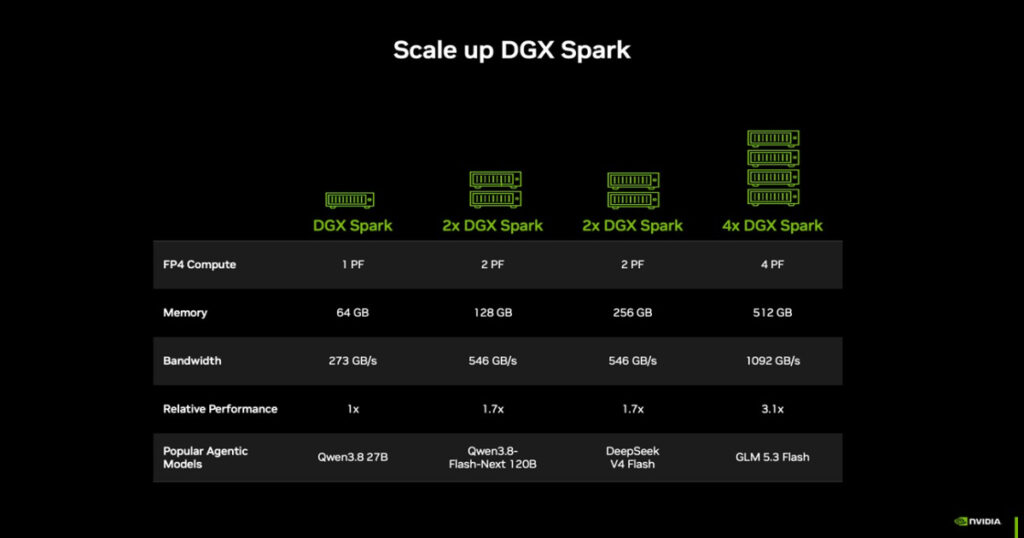
Every DGX Spark has a fast built-in network port (NVIDIA ConnectX-7). Two units can be joined with a QSFP cable, and together they pool their memory to 128GB. NVIDIA says this lets them support models of up to 200 billion parameters and gives twice the memory bandwidth.
Setting this up could sound scary, but the NVIDIA Sync Cluster Assistant is meant to handle the hard part. It detects the connected units, checks their settings, and sets up the network for you. Every machine runs the same software, so nothing needs to be reconfigured when you go from one unit to two.
On speed, NVIDIA ran a test with the Qwen 3.8 27B model. Two clustered 64GB systems delivered up to 1.7 times the performance of a single system. That is not a perfect doubling, but it shows that adding a second box gives a real boost. Keep in mind this is NVIDIA’s own test, so your own results may differ.
Coming Soon: NVIDIA Sync Model Launcher
At the end of the month, NVIDIA plans to release the NVIDIA Sync Model Launcher. The goal is to make local AI as simple as clicking a few buttons.
With it, you can download and launch Qwen3.8 27B on one DGX Spark or on a cluster. NVIDIA Sync sets up the model across your connected devices and makes it reachable from your laptop. It also sets up OpenCode, so you can start coding in your browser using that model.
Three Practical Ways to Use DGX Spark 64GB
NVIDIA lists three simple workflows:
- Run an AI agent around the clock. Keep a coding or research agent running all day. It can review code, read documents, or carry out tasks with many steps. A cluster gives room for bigger models, longer context, or several agents at once.
- Power AI apps on your everyday PC. Let the DGX Spark do the heavy model work while you use an app on your laptop or desktop. Your PC stays free for other tasks.
- Scale when the work grows. When one unit is not enough, connect a second one and keep the same workflow.
Who Should Consider It (And Who Might Not Need It)
This is my own view, based on the details NVIDIA shared.
It may suit you if:
- You work with sensitive data and want to run AI models locally
- You build or test AI agents and want a machine that runs all day
- You are tired of cloud bills adding up for heavy experiments
- You like the idea of starting small and adding a second unit later
You may not need it if:
- You only chat with AI a few times a week
- You never plan to fine-tune or host models yourself
- Your budget is tight, since $4,999 is a real investment
For light use, a cloud AI service is often the simpler and cheaper choice. A machine like this makes sense when you will use it often.
DGX Spark 64GB shows where AI is heading: smaller, closer to you, and more private. For developers and researchers who want to experiment without sending every task to the cloud, it offers a clear starting point, with a simple path to grow later.
If you are curious about local AI, it is worth watching how this machine performs once real users get their hands on it after October 23.