Top 5 HP Laptops to Buy in 2026

Choosing a new laptop in 2026 is no longer simply about finding the fastest processor or the biggest amount of RAM. With AI-powered PCs becoming more common, OLED displays moving into more models, and newer processors bringing dedicated AI acceleration, the right laptop depends heavily on how you plan to use it.
Top 5 HP Laptops to Buy in 2026
HP has also refreshed its laptop portfolio, with the OmniBook family covering a wide range of productivity and everyday computing needs, while OMEN continues to focus on high-performance gaming. This gives buyers options ranging from lightweight laptops for students and professionals to powerful machines designed for gaming, content creation and demanding workloads.
But with different configurations, processors, display technologies and price points available under the same product family, choosing the right HP laptop can become confusing.
In this guide, we look at five HP laptops worth considering in 2026, covering different types of users and requirements. Whether you are looking for a premium laptop for professional work, a portable machine with long battery life, an everyday laptop for college and home use, or a powerful gaming laptop, this list will help you understand what each model offers and which type of user it is designed for.
We will look at their performance, displays, AI capabilities, battery life, connectivity, design, specifications, pricing in India and key advantages and limitations to help you make a more informed buying decision.
1. HP OmniBook Ultra 14: Best for Premium Productivity and AI-Powered Work
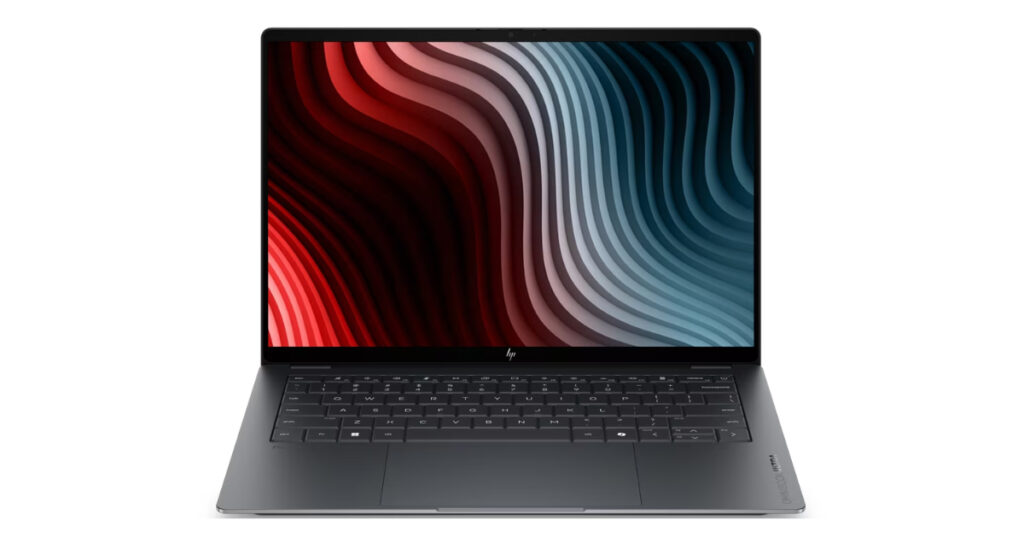
The HP OmniBook Ultra 14 is positioned at the premium end of HP’s consumer laptop lineup, combining a slim design with a high-resolution OLED display, modern Intel Core Ultra processing and dedicated hardware for AI workloads. It is aimed at users who want a compact laptop for professional work, multitasking, content creation and everyday productivity without moving to a much larger machine.
For the Indian market, HP currently lists configurations with an Intel Core Ultra 7 356H processor, 16GB LPDDR5x RAM and a 1TB SSD. The higher-end configuration listed by HP features a 14-inch 3K OLED touchscreen with a 120Hz refresh rate and 0.2ms response time.
Design and display
One of the biggest attractions of the OmniBook Ultra 14 is its display. The 14-inch panel has a 2880 × 1800 resolution, a 16:10 aspect ratio and OLED technology. HP rates the display at up to 500 nits for SDR and 1,100 nits for HDR, with 100% DCI-P3 colour coverage. It also supports touch input and a 120Hz refresh rate.
The combination makes the laptop particularly interesting for people who spend long hours working with documents, presentations, images and video. The taller 16:10 aspect ratio also provides additional vertical screen space compared with a traditional 16:9 laptop.
The OLED panel is also useful for entertainment, delivering deeper blacks and stronger contrast than a conventional LCD panel.
Performance
The 2026 Intel configuration is powered by the Intel Core Ultra 7 356H, a 16-core, 16-thread processor with boost speeds of up to 4.7GHz. HP also lists Intel AI Boost with 50 NPU TOPS, giving the laptop dedicated hardware for compatible AI workloads.
The laptop comes with 16GB of LPDDR5x memory and a 1TB SSD in the current HP India configuration. The memory is onboard, so buyers should consider their RAM requirements carefully before purchasing.
For everyday professional workloads, this hardware is designed to handle tasks such as:
- Office applications
- Web browsing with multiple tabs
- Video conferencing
- Photo editing
- Content creation
- Multitasking
- AI-enabled applications
- Streaming and entertainment
The laptop uses integrated Intel graphics rather than a dedicated GPU, so it is not intended to compete with HP’s OMEN gaming machines for demanding AAA gaming or GPU-heavy workloads.
AI capabilities
AI is an important part of the OmniBook Ultra 14’s positioning.
The Intel Core Ultra 7 356H configuration includes a dedicated NPU, which can handle certain AI tasks more efficiently than relying exclusively on the CPU. This can be useful for supported Windows and application-level features such as AI-enhanced video calls, image processing and other on-device AI workloads.
This is an important distinction when looking at the growing number of “AI PC” laptops in 2026. The presence of an NPU does not mean every application automatically becomes faster. Its usefulness depends on whether the software actually supports NPU acceleration.
Connectivity
HP equips the OmniBook Ultra 14 with three Thunderbolt 4 USB-C ports, supporting high-speed data transfer, DisplayPort 2.1 and USB Power Delivery. There is also a headphone/microphone combo jack. Wireless connectivity includes Wi-Fi 7 and Bluetooth 6.0.
The port selection makes the laptop suitable for users who work with external monitors, fast storage and USB-C accessories. However, buyers who regularly use traditional USB-A devices or HDMI may need adapters or a USB-C hub.
Camera and video calls
For remote workers and professionals, HP includes a 5MP IR camera with HDR, along with noise-reduction features and dual-array digital microphones. The IR capability also supports Windows Hello-style facial authentication.
This makes the laptop more suitable for hybrid work and frequent video meetings than a basic laptop with a lower-resolution webcam.
Portability
Despite its premium hardware, the OmniBook Ultra 14 remains relatively compact. The HP India configuration weighs approximately 1.27kg, making it practical for people who regularly carry their laptop between home, office, college or travel destinations.
This is one of the reasons the 14-inch format continues to be popular. It offers enough screen space for productivity while remaining considerably easier to carry than a 16-inch performance laptop.
Price in India
At the time of checking in October 2026, HP India’s store lists the OmniBook Ultra 14 configuration with Core Ultra 7 356H, 16GB RAM, 1TB SSD and a 3K OLED touchscreen at ₹2,19,999, including taxes. HP also lists another configuration at ₹2,24,499 with a non-OLED 3K touchscreen. Prices and promotional offers can change, so readers should check the current listing before purchasing.
Who should buy the HP OmniBook Ultra 14?
The OmniBook Ultra 14 makes sense for users who want:
- A premium 14-inch laptop
- A high-resolution OLED touchscreen
- Strong everyday and professional performance
- Dedicated AI acceleration
- 1TB SSD storage
- Fast modern connectivity
- A lightweight design
- A high-quality webcam for meetings
- A laptop suitable for work, travel and entertainment
Who should consider another HP laptop?
Gamers and users who regularly perform GPU-intensive work should look at HP’s OMEN lineup instead, particularly models with dedicated NVIDIA graphics.
Similarly, users who primarily need a laptop for browsing, Office work and college assignments may not need to spend over ₹2 lakh on a premium OmniBook Ultra configuration. HP’s lower-priced OmniBook models can be more appropriate for those requirements.
HP OmniBook Ultra 14: Key specifications
- Display: 14-inch 3K OLED touchscreen
- Resolution: 2880 × 1800
- Refresh rate: Up to 120Hz
- Processor: Intel Core Ultra 7 356H
- CPU cores: 16
- RAM: 16GB LPDDR5x
- Storage: 1TB SSD
- Graphics: Integrated Intel Graphics
- NPU: Intel AI Boost, 50 TOPS
- Webcam: 5MP IR
- Wireless: Wi-Fi 7, Bluetooth 6.0
- Ports: 3 × Thunderbolt 4 USB-C, headphone/mic
- Operating system: Windows 11 Home
- Weight: Approx. 1.27kg
- India price checked ₹2,19,999
2. HP OmniBook X 14: Best for Portability, Battery Life and Everyday Productivity
The HP OmniBook X 14 is designed for users who want a lightweight laptop that can handle professional work, study, entertainment and AI-enabled applications without taking up much space in a backpack. It sits in HP’s OmniBook family as a portable 14-inch machine, with 2026 configurations spanning both Intel-based and newer Snapdragon-based platforms. HP’s current India store lists an Intel-based OmniBook X 14 with a Core Ultra 7 356H processor, 16GB RAM, 1TB SSD and a 3K OLED touchscreen.
For this article, the Intel Core Ultra 7 356H configuration is the most relevant current India model to discuss because it is directly listed by HP India. At the time of checking, HP lists it at ₹1,89,999 including taxes.
Design and portability
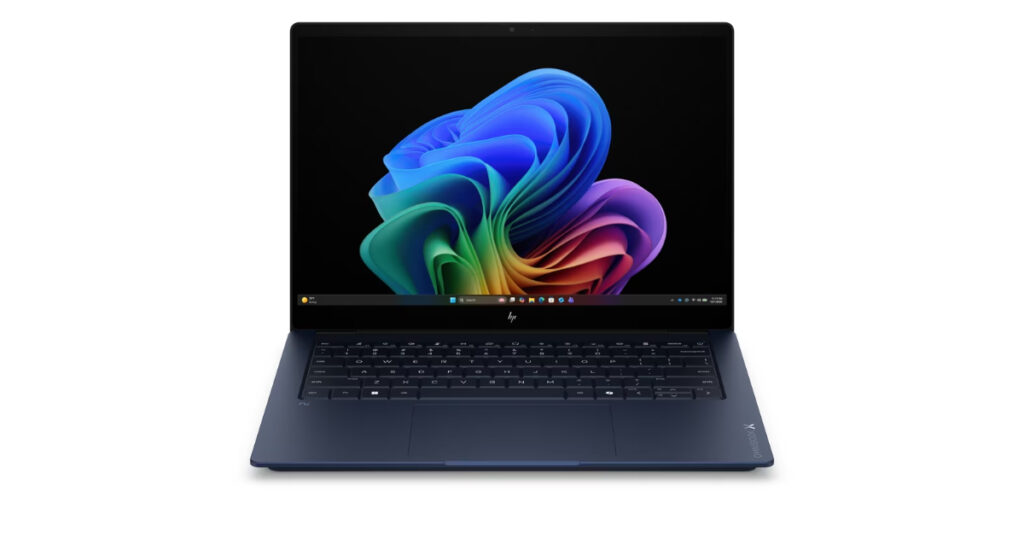
Portability is one of the main reasons to consider the OmniBook X 14. The laptop measures approximately 31.36 × 22.52 × 1.26 cm and weighs around 1.3kg in the current Indian configuration. HP uses an aluminum chassis with a sandblasted anodized finish, giving the laptop a premium appearance while keeping the overall design relatively compact.
The 14-inch form factor is useful for people who regularly move between home, office, college and travel. It offers more working space than smaller ultra portables while remaining considerably easier to carry than a typical 15- or 16-inch laptop.
HP also uses a 16:10 aspect ratio, which gives users additional vertical screen space for documents, websites and productivity applications.
Display
The current HP India configuration features a 14-inch 3K OLED touchscreen with a resolution of 2880 × 1800 pixels. It supports a refresh rate of up to 120Hz, has a 0.2ms response time and covers 100% of the DCI-P3 color gamut. HP rates the panel at up to 500 nits for SDR and 1,100 nits for HDR.
The combination of OLED, high resolution and a 120Hz refresh rate makes the display suitable for more than just office work. Users can also benefit from the panel for photo editing, video consumption and other visually demanding tasks.
The 16:10 layout is another practical advantage for productivity because more content can fit vertically on the screen when working with documents or browsing long webpages.
Performance
The Indian configuration is powered by the Intel Core Ultra 7 356H, which has 16 cores and 16 threads, with a maximum boost frequency of up to 4.7GHz. The processor also includes Intel AI Boost with 50 NPU TOPS, providing dedicated hardware for compatible AI workloads.
The laptop comes with 16GB of LPDDR5x-8533 memory and a 1TB PCIe Gen4 NVMe SSD. The RAM is onboard, so buyers should choose their preferred memory configuration carefully when purchasing.
For everyday users, this hardware is well suited to tasks such as:
- Working with Microsoft Office
- Web browsing and research
- Video conferencing
- Streaming
- Photo editing
- Multitasking
- Content creation
- AI-enabled applications
- Managing large numbers of browser tabs
The integrated Intel graphics are suitable for everyday graphics workloads, but this isn’t primarily a gaming laptop. Users looking for serious gaming performance or GPU-intensive professional applications should consider an HP model with dedicated graphics.
AI features
Like many premium laptops launched in 2026, the OmniBook X 14 includes dedicated hardware for AI processing.
The Intel Core Ultra 7 356H’s NPU provides up to 50 TOPS, allowing supported AI workloads to be handled locally on the device. HP also includes features such as Copilot in Windows and an AI-focused software ecosystem.
The important point for buyers is that an NPU is most useful when applications are designed to take advantage of it. It can help with certain AI-powered productivity, communication and creative features, but it doesn’t mean every program will automatically run faster.
Connectivity
The OmniBook X 14 has a useful selection of modern ports.
The current configuration includes:
- 2 × Thunderbolt 4 USB-C ports
- 2 × USB-A ports
- 1 × HDMI 2.1
- 1 × headphone/microphone combo jack
The Thunderbolt 4 ports support up to 40Gbps signaling, USB Power Delivery and DisplayPort 2.1. The HDMI 2.1 port can also connect the laptop to an external display.
Wireless connectivity includes Wi-Fi 7 and Bluetooth 6.0. Wi-Fi 7 requires a compatible router to take advantage of its newer capabilities.
The combination of USB-C, USB-A and HDMI is particularly useful for professionals because it reduces the need for adapters when connecting common peripherals.
Camera and audio
For hybrid workers and students attending online classes, the OmniBook X 14 includes a 5MP IR camera with HDR, a privacy shutter and temporal noise reduction. It also features dual-array digital microphones.
HP pairs this with Poly Studio, DTS:X Ultra and dual speakers with HP Audio Boost. This makes the laptop suitable for video meetings, online classes and entertainment without immediately requiring external speakers or a webcam.
Battery and charging
Battery capacity varies by configuration. HP lists both 59Wh and 70Wh battery options for the OmniBook X 14 series. The laptop also supports fast charging, with HP stating that compatible configurations can reach up to 50% charge in around 30 minutes when using a 100W adapter and the system is switched off.
Actual battery life will depend heavily on the processor, display, brightness, applications and workload. Users choosing the OLED configuration should also keep in mind that a high-resolution, high-refresh display can consume more power than a lower-resolution panel.
Snapdragon X2 option in the 2026 lineup
The OmniBook X 14 family has also expanded into newer Snapdragon-based configurations in 2026. HP’s March 2026 specifications list a Snapdragon X2 Plus X2P-42-100 configuration with an 80 TOPS Qualcomm Hexagon NPU, 16GB or 32GB LPDDR5x memory and a 59Wh battery.
This is worth mentioning in a 2026 buying guide because processor architecture can affect application compatibility. Buyers should check whether the Windows applications and peripherals they rely on work properly with an ARM-based Snapdragon configuration before choosing it.
Price in India
At the time of checking in October 2026, HP India lists the OmniBook X 14 14-ka0068TU with Core Ultra 7 356H, 16GB RAM, 1TB SSD and a 3K OLED touchscreen at ₹1,89,999 including taxes. HP lists an MRP of ₹3,31,144 for this configuration, although the current selling price reflects a promotional discount.
Prices and promotional offers can change, so the article should treat this as the price checked at publication rather than a permanent price.
Who should buy the HP OmniBook X 14?
The OmniBook X 14 is worth considering for users who want:
- A lightweight 14-inch laptop
- A premium aluminium design
- A high-resolution OLED touchscreen
- Strong productivity performance
- Modern AI acceleration
- 16GB RAM and 1TB SSD
- Wi-Fi 7
- Thunderbolt 4 connectivity
- A high-quality webcam
- A laptop suitable for work and travel
It is particularly well suited to professionals, students, freelancers, content consumers and frequent travelers who value portability without wanting to compromise heavily on display quality.
Who should consider another HP laptop?
Gamers who need dedicated graphics should look at HP’s OMEN or Victus ranges instead.
Likewise, buyers who primarily need a laptop for basic browsing, documents and online classes may find the OmniBook X 14’s premium display and hardware unnecessary for their needs. A lower-priced OmniBook configuration could provide better value for those workloads.
HP OmniBook X 14: Key specifications
- Display: 14-inch 3K OLED touchscreen
- Resolution: 2880 × 1800
- Refresh rate: Up to 120Hz
- Aspect ratio: 16:10
- Processor: Intel Core Ultra 7 356H
- CPU cores: 16
- RAM: 16GB LPDDR5x
- Storage: 1TB PCIe Gen4 SSD
- Graphics: Integrated Intel Graphics
- NPU: Intel AI Boost, 50 TOPS
- Webcam: 5MP IR
- Wireless: Wi-Fi 7, Bluetooth 6.0
- Ports: 2 × Thunderbolt 4, 2 × USB-A, HDMI 2.1
- Battery: Up to 70Wh, depending on configuration
- Weight: Approx. 1.3kg
- Operating system: Windows 11 Home
India price checked ₹1,89,999
3. HP OmniBook 7: Best for Professional Work, Multitasking and Students
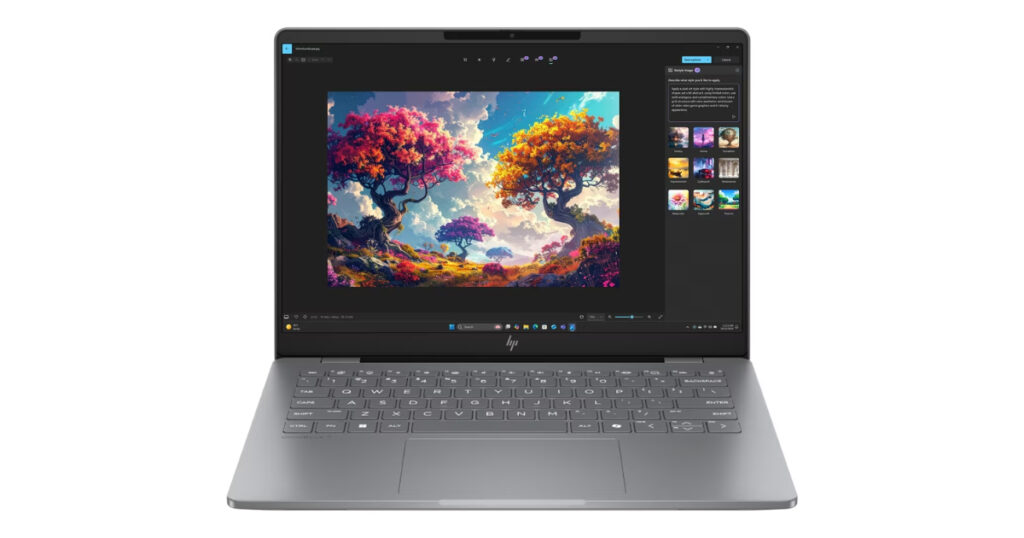
The HP OmniBook 7 is positioned as a versatile laptop for users who need more performance than a basic everyday notebook but do not necessarily need a dedicated gaming laptop. HP describes the OmniBook 7 as a machine designed for power users and students, with an emphasis on durability, multitasking, AI features and portability.
One useful thing about the OmniBook 7 lineup in 2026 is that HP offers several configurations. In India, current options include a Core Ultra 5 225H model with 16GB RAM and 1TB SSD, a Core Ultra 7 255H model with 32GB RAM and 1TB SSD, and a higher-end Core Ultra X7 358H model with 32GB RAM, 1TB SSD and Intel Arc B390 graphics.
For this article, the Core Ultra 7 255H configuration is a good representative of the OmniBook 7 because it sits between the more affordable OmniBook 7 configuration and the considerably more expensive X7 model.
Design and durability
The OmniBook 7 is designed as a portable productivity laptop rather than a bulky performance machine. HP specifically highlights durability, with the newer OmniBook 7 Next Gen AI configuration tested against 11 MIL-STD standards covering conditions such as temperature, humidity and minor drops.
This makes the series particularly relevant for people who carry their laptop regularly between home, college, office and travel.
The 14-inch format also keeps the overall footprint manageable while providing enough screen space for documents, spreadsheets, presentations and browser-based work.
Display
The Core Ultra 7 255H configuration available through HP India features a 14-inch 3K OLED display with a resolution of 2880 × 1800 pixels.
The panel supports a 120Hz refresh rate and has a 0.2ms response time. HP also lists 100% DCI-P3 colour coverage, making the display suitable for users who care about colour reproduction as well as everyday productivity.
The 16:10 aspect ratio is another practical feature. Compared with a conventional 16:9 panel, the additional vertical space can make working with documents and webpages more comfortable because more content can fit on screen before scrolling.
For entertainment, the OLED panel provides the deep blacks and high contrast associated with OLED displays.
Performance
The Core Ultra 7 255H configuration comes with 32GB of RAM and a 1TB SSD, giving it considerably more memory headroom than many mainstream laptops.
The processor is an Intel Core Ultra 7 255H, and graphics are handled by Intel Arc 140T integrated graphics. HP positions the machine around fast multitasking and AI-enhanced productivity rather than dedicated gaming performance.
For professional users, 32GB of RAM can be particularly useful when working with several applications simultaneously. A typical workload might involve a browser with multiple tabs, Microsoft Office, communication software, cloud applications and image-editing tools running at the same time.
The 1TB SSD also gives users considerably more room for documents, photographs, applications and other files than a basic 256GB or 512GB configuration.
AI capabilities
The OmniBook 7 is part of HP’s newer generation of AI PCs.
HP describes the laptop as an AI PC and includes a dedicated Copilot key for quick access to Windows’ AI features. The platform also includes an NPU designed to accelerate supported AI workloads.
AI acceleration can be useful for supported applications involving tasks such as video-call enhancements, image processing and other on-device AI functions.
However, buyers should look at the actual applications they use rather than choosing a laptop simply because it carries an “AI PC” label. NPU acceleration depends on software support, and conventional CPU and GPU performance remains important for many workloads.
Graphics performance
The Core Ultra 7 255H version uses Intel Arc 140T graphics, which are integrated into the platform. This gives the OmniBook 7 more graphics capability than a basic integrated-graphics notebook, making it suitable for everyday creative applications, casual gaming and accelerated media workloads.
The lineup becomes significantly more powerful with HP’s newer Core Ultra X7 358H configuration, which uses a dedicated Intel Arc B390 GPU. HP India lists this configuration with 32GB RAM and a 1TB SSD.
That model, however, is positioned at a substantially higher price, so buyers should compare the actual workload requirements before paying the premium.
Connectivity
The OmniBook 7 is designed for modern professional connectivity, with HP listing USB-C with Thunderbolt and Wi-Fi 7 among the features available in the series.
This is useful for users who connect their laptop to external monitors, fast storage, docking stations and other peripherals.
Wi-Fi 7 can also provide higher performance on compatible networks, although the real-world benefit depends on the user’s router and network environment.
Video calls and communication
Video conferencing has become a standard part of both professional and academic life, and HP includes AI-enhanced video-call features in the OmniBook 7.
The laptop is designed to improve the experience during online meetings through features aimed at image and audio quality. HP specifically highlights AI-enhanced video calls as one of the laptop’s productivity features.
This makes the OmniBook 7 particularly relevant for remote workers, students attending online classes and professionals who frequently use platforms such as Microsoft Teams or Zoom.
Software and productivity
The current Indian Core Ultra 7 configuration includes Windows 11 Home and Microsoft Office Home 2024.
For someone buying a laptop primarily for work or study, having Office included can reduce the need to purchase a separate productivity suite.
The combination of 32GB RAM, 1TB SSD storage and a 3K OLED display also makes the configuration suitable for users who expect their laptop to remain comfortable for several years rather than simply meeting basic requirements today.
Price in India
HP’s India store currently lists the HP OmniBook 7 14-fr0116TU, equipped with a Core Ultra 7 255H, 32GB RAM, 1TB SSD, 3K OLED 120Hz display and Intel Arc 140T graphics, at approximately ₹1,79,999, including taxes.
HP also lists a more affordable Core Ultra 5 225H, 16GB RAM and 1TB SSD configuration at ₹1,39,999.
At the other end of the lineup, the Core Ultra X7 358H model with Intel Arc B390 graphics is listed at ₹2,49,999.
This wide price range is important because the name “OmniBook 7” alone does not tell the whole story. Buyers should always check the exact processor, RAM, graphics and display configuration before comparing prices.
Who should buy the HP OmniBook 7?
The OmniBook 7 is a strong fit for users looking for:
- A premium 14-inch laptop
- Professional productivity
- Heavy multitasking
- 16GB or 32GB RAM options
- 1TB SSD storage
- A high-resolution OLED display
- Modern AI capabilities
- Fast wireless connectivity
- A portable design
- A laptop for both work and study
It is particularly relevant for professionals, freelancers, students, business users and people who regularly work with multiple applications simultaneously.
Who should consider another HP laptop?
If your main requirement is gaming, the OmniBook 7 is not HP’s gaming-focused option. A dedicated gaming laptop such as an OMEN or Victus model would offer a more appropriate graphics platform.
On the other hand, someone who mainly uses a laptop for email, browsing, documents and video calls may not need the 32GB configuration. The Core Ultra 5 version can provide a more economical route into the same general product family.
HP OmniBook 7: Key specifications
- Display: 14-inch 3K OLED
- Resolution: 2880 × 1800
- Refresh rate: Up to 120Hz
- Aspect ratio: 16:10
- Processor: Intel Core Ultra 7 255H
- RAM: 32GB LPDDR5
- Storage: 1TB SSD
- Graphics: Intel Arc 140T
- AI: Intel AI capabilities/NPU
- Operating system: Windows 11 Home
- Office: Microsoft Office Home 2024
- Wireless: Wi-Fi 7
- Display colour: 100% DCI-P3
- India price checked ₹1,79,999
4. HP OmniBook 5: Best for Students, Everyday Work and Home Use
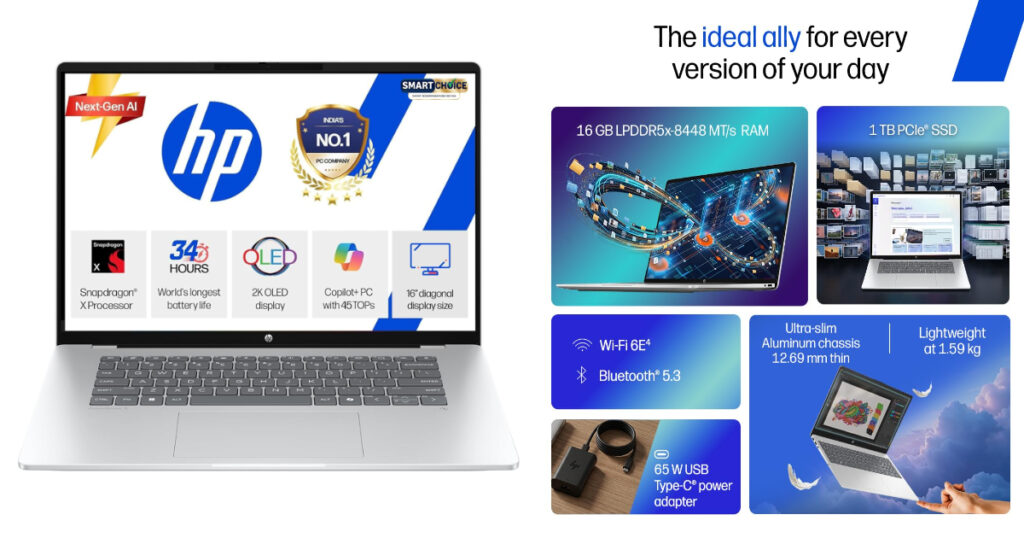
The HP OmniBook 5 is aimed at users who want a modern Windows laptop for everyday productivity without moving into HP’s more expensive premium OmniBook models. It is designed around common workloads such as studying, office applications, web browsing, video calls, entertainment and light creative work.
In 2026, the OmniBook 5 family is available in multiple processor and display configurations. HP’s India lineup includes models with Intel Core Ultra processors, as well as configurations using AMD Ryzen AI processors. This makes it important to look at the exact specification rather than treating every OmniBook 5 model as identical. (hp.com)
For this guide, the 14-inch OmniBook 5 configuration with an Intel Core Ultra 5 225H processor, 16GB RAM and 512GB SSD provides a useful example of the kind of system the range is designed to offer.
Design and everyday usability
The OmniBook 5 focuses on a straightforward, portable design rather than the more premium positioning of the OmniBook Ultra.
The 14-inch form factor makes it practical for students and professionals who carry their laptop regularly. It can fit comfortably into a backpack while still offering enough screen area for documents, presentations, spreadsheets and web browsing.
This makes the OmniBook 5 particularly relevant for users who need one laptop to move between college, home, office and entertainment rather than a specialised machine for one particular task.
Display options
One of the advantages of the OmniBook 5 range is the variety of display configurations.
HP offers the series with different panel types and resolutions depending on the exact model. Higher-end configurations can feature 2K OLED displays, while other versions use IPS panels.
For example, HP India lists an OmniBook 5 14-inch configuration with a 14-inch 2K OLED display, a 1920 × 1200 resolution, 60Hz refresh rate and 400-nit brightness. (hp.com)
The OLED configuration can be attractive for users who spend significant time watching movies, editing photographs or simply want a more contrast-rich display.
However, buyers should check the exact panel before purchasing because the specifications can vary substantially between OmniBook 5 configurations.
Performance
The OmniBook 5 is designed primarily for productivity rather than high-end gaming or workstation workloads.
One current HP India configuration uses the Intel Core Ultra 5 225H, paired with 16GB RAM and a 512GB SSD. (hp.com)
That combination is appropriate for everyday workloads such as:
- Microsoft Office
- Web browsing
- Online classes
- Video conferencing
- Streaming
- Research
- Light photo editing
- Social media management
- General multitasking
For a student or office user, 16GB of RAM is a sensible configuration because it provides more room for multitasking than entry-level 8GB systems.
The 512GB SSD provides enough space for applications, documents, photographs and other everyday files, although users who work with large video libraries or extensive creative projects may prefer a 1TB configuration.
AI-ready hardware
The OmniBook 5 is part of HP’s newer generation of AI-enabled PCs.
Depending on the configuration, the laptop can include Intel or AMD processors with dedicated AI acceleration. HP also highlights features such as Copilot+ PC capabilities on selected OmniBook 5 models. (hp.com)
The practical benefit of an NPU depends on the software being used. Supported applications can use the dedicated AI hardware for tasks such as image processing, video-call effects and other AI features while potentially reducing the workload placed on the CPU.
For an everyday user, however, the more important factors remain processor performance, RAM, storage, display quality and battery life.
Graphics
The OmniBook 5 relies primarily on integrated graphics rather than a dedicated gaming GPU.
This is perfectly reasonable for its intended audience. Integrated graphics can handle everyday Windows applications, high-resolution video playback, office software and many light creative workloads.
However, anyone planning to play demanding AAA games or perform heavy GPU-accelerated 3D rendering should look beyond the OmniBook 5. HP’s OMEN and Victus ranges are designed specifically for users who need dedicated graphics hardware.
Battery and charging
Battery specifications vary between OmniBook 5 configurations, so the exact model number matters when comparing machines.
The range is designed for mobile productivity, allowing users to work away from a power outlet for extended periods. Actual endurance will depend on the processor, display type, brightness, applications and workload.
OLED models can consume more power under some conditions, particularly when displaying bright content at higher brightness levels. This is one reason battery claims should be treated as estimates rather than guarantees of real-world runtime.
Connectivity
HP equips the OmniBook 5 family with modern connectivity options, although the exact port selection varies by configuration.
Depending on the model, users can find combinations of:
- USB-C
- USB-A
- HDMI
- Headphone/microphone connectivity
- Wi-Fi
- Bluetooth
This gives the laptop enough flexibility for common accessories such as external displays, mice, keyboards, headphones and USB storage.
For students and office users, having both USB-C and traditional USB-A ports can be particularly convenient because it avoids requiring adapters for every older peripheral.
Webcam and video calls
The OmniBook 5 is also designed for the increasingly common requirement of remote communication.
Selected configurations include an FHD camera, along with HP’s software and AI-based features for improving the video-call experience. (hp.com)
For students attending online lectures or professionals working from home, a good webcam can be more useful than specifications that only affect benchmark performance.
Software
The OmniBook 5 runs Windows 11, with the exact bundled software depending on the configuration and region.
HP’s current Indian listings include configurations with Microsoft Office Home 2024, which can be useful for students and home users who need Word, Excel and PowerPoint without purchasing the suite separately. (hp.com)
Price in India
Pricing varies considerably across the OmniBook 5 family because HP sells the laptop with different processors, displays, memory and storage options.
For example, HP India lists the OmniBook 5 14-eh0021TU with an Intel Core Ultra 5 225H, 16GB RAM, 512GB SSD and 2K OLED display at approximately ₹89,999 including taxes at the time of checking in October 2026. (hp.com)
Because HP frequently runs promotions, readers should verify the current selling price before purchasing.
Who should buy the HP OmniBook 5?
The OmniBook 5 makes sense for users who want:
A relatively affordable modern HP laptop
- A portable 14-inch form factor
- 16GB RAM
- SSD storage
- Windows 11
- AI-ready hardware
- A good display for work and entertainment
- A laptop for college or office use
- Good everyday multitasking
It is especially suited to students, home users, office workers, freelancers and casual content consumers.
Who should consider another HP laptop?
If you’re a professional working with demanding video editing, 3D rendering or GPU-heavy applications, the OmniBook 5 may not provide the graphics performance you need.
Similarly, users who want a premium OLED display, substantially more RAM or higher-end processing may want to step up to an OmniBook 7 or OmniBook Ultra.
Gamers should look toward the OMEN or Victus families instead.
HP OmniBook 5: Key specifications
- Display 14-inch 2K OLED
- Resolution 1920 × 1200
- Refresh rate 60Hz
- Processor Intel Core Ultra 5 225H
- RAM 16GB
- Storage 512GB SSD
- Graphics Integrated graphics
- AI Dedicated AI/NPU capabilities
- Operating system Windows 11
- Webcam FHD, configuration dependent
- Use case Study, office, browsing, entertainment
- India price checked Approx. ₹89,999
Is the HP OmniBook 5 worth considering in 2026?
The OmniBook 5 makes the most sense when the goal is balanced everyday computing rather than maximum performance. Its different configurations also give buyers some flexibility, allowing them to choose between processors, displays and storage based on their budget.
For a student writing assignments, an employee working with Office applications, or a home user who wants a modern Windows laptop for browsing and entertainment, the OmniBook 5 covers the fundamentals without requiring the price jump associated with HP’s premium models.
5. HP OMEN MAX 16: Best for Gaming and High-Performance Workloads
The HP OMEN MAX 16 takes the final spot in our list for users who need substantially more performance than a conventional productivity laptop can provide. Unlike the OmniBook models discussed above, the OMEN MAX 16 is built specifically around gaming, high-performance computing and demanding creative workloads.
HP’s current India lineup includes configurations with Intel Core Ultra 9 275HX processors and NVIDIA GeForce RTX 5090 graphics, alongside lower-priced RTX 5080, RTX 5070 and RTX 5060 versions. This means buyers can choose a configuration according to their performance requirements and budget.
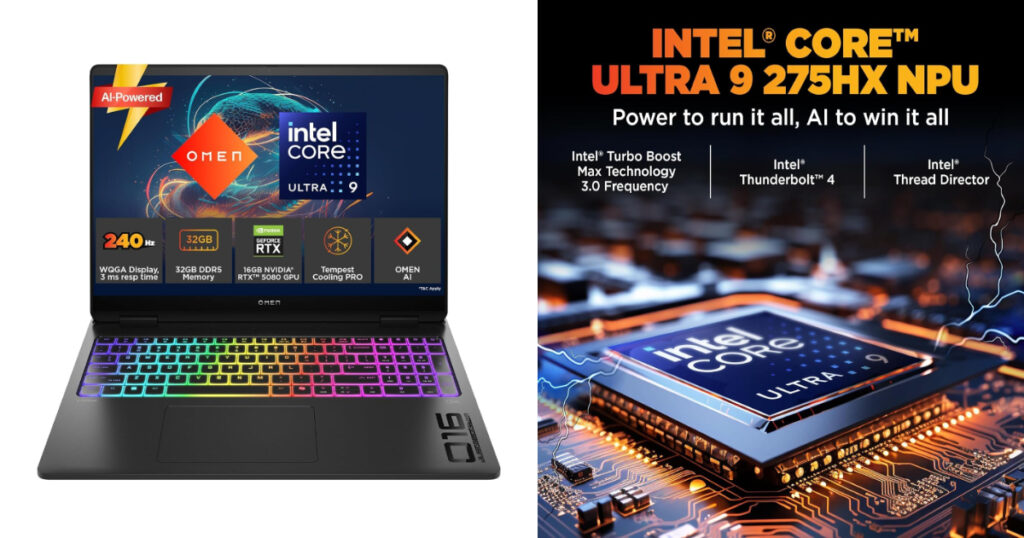
For a flagship configuration, HP India currently lists an OMEN MAX 16 with Core Ultra 9 275HX, RTX 5090 24GB, 64GB DDR5 RAM, 2TB SSD and a 16-inch WQXGA OLED display with a 240Hz refresh rate. The listed selling price is approximately ₹3,99,999 including taxes.
Design and build
The OMEN MAX 16 has a very different design philosophy from the slim OmniBook models.
It is a larger performance laptop with the hardware and cooling system required for a high-powered CPU and dedicated NVIDIA GPU. HP gives it a Shadow Black finish and a full-size keyboard with a numeric keypad.
The keyboard also features per-key RGB lighting, allowing users to customise individual keys rather than relying on a single backlight zone. HP includes NKRO anti-ghosting technology, which is particularly useful during gaming because multiple simultaneous key presses can be registered accurately.
The larger chassis is a trade-off for the performance hardware inside. This isn’t the laptop you choose primarily because you want something feather-light for daily commuting.
Display
One of the standout features of the higher-end OMEN MAX 16 configuration is its 16-inch WQXGA OLED display.
The panel has a 2560 × 1600 resolution, a 240Hz refresh rate and a response time of just 0.2ms.
The 16:10 aspect ratio provides additional vertical screen space compared with a traditional 16:9 gaming display. That can be useful not only for games but also for video editing, coding, design applications and other productivity tasks.
The 240Hz refresh rate is particularly relevant to competitive gaming, where a high refresh rate can provide smoother motion when the hardware is capable of delivering sufficiently high frame rates.
HP also sells OMEN MAX 16 configurations with WQXGA IPS displays supporting 60-240Hz, so buyers should check the exact display specification before purchasing.
Performance
At the top of the lineup, the OMEN MAX 16 uses the Intel Core Ultra 9 275HX processor.
The flagship configuration combines this CPU with an NVIDIA GeForce RTX 5090 laptop GPU with 24GB of GDDR7 memory, giving it a completely different performance profile from the integrated-graphics OmniBook laptops earlier in this guide.
The RTX 5090 configuration is aimed at users who need substantial GPU performance for demanding games, 3D applications, rendering, AI workloads and other graphics-intensive tasks.
However, not everyone needs this level of hardware. HP also offers the OMEN MAX 16 with RTX 5080, RTX 5070 and RTX 5060 graphics, allowing buyers to choose a less expensive configuration.
Graphics and gaming
Gaming is where the OMEN MAX 16 separates itself most clearly from the other laptops in this article.
The flagship RTX 5090 configuration has 24GB of GDDR7 graphics memory, while the RTX 5080 version has 16GB. Lower configurations are available with RTX 5070 and RTX 5060 GPUs.
This makes the OMEN MAX 16 suitable for modern demanding games, particularly when paired with its high-refresh-rate display.
The dedicated GPU also has applications beyond gaming. Users working with video editing, 3D modelling, animation, rendering or GPU-accelerated creative software can benefit from having substantially more graphics processing power than an integrated GPU can provide.
Memory and storage
HP’s higher-end configurations offer substantial memory and storage.
The flagship model available in India comes with 64GB DDR5-5600 RAM and a 2TB SSD, while another RTX 5090 configuration is available with 32GB RAM and a 1TB SSD.
The 64GB configuration is particularly relevant for demanding professional workloads. Large creative projects, virtual machines, high-resolution video editing and certain AI workloads can all benefit from additional memory.
For gaming alone, however, most buyers do not necessarily need 64GB. A 32GB configuration can provide a more practical balance for many users.
Cooling and sustained performance
A powerful processor and flagship GPU generate considerably more heat than the hardware found in an ultraportable laptop.
The OMEN MAX 16 therefore uses a performance-oriented chassis and cooling system designed around sustained workloads. This is important because gaming and rendering can place the CPU and GPU under heavy load for extended periods.
When buying a gaming laptop, it is worth looking beyond headline specifications. Cooling, power limits and sustained performance can have a significant impact on how the hardware behaves during long gaming or rendering sessions.
Keyboard
The full-size keyboard is another feature aimed at gamers and power users.
HP includes:
- Per-key RGB backlighting
- Numeric keypad
- NKRO anti-ghosting
- Customisable lighting
- Dedicated gaming-oriented keyboard features
- The full-size layout can also be useful for productivity tasks involving spreadsheets and numerical data.
Camera and audio
The OMEN MAX 16 includes an HP True Vision 1080p FHD camera, with HP also offering IR camera configurations and a camera privacy shutter on selected models.
For audio, HP lists DTS:X Ultra, dual speakers, HP Audio Boost and HyperX audio features on the higher-end configurations.
This makes the laptop suitable for gaming, streaming, video calls and entertainment without necessarily requiring external audio equipment immediately.
AI capabilities
The OMEN MAX 16 also belongs to the newer generation of laptops incorporating AI-capable hardware.
The Core Ultra 9 275HX provides CPU and platform-level AI capabilities, while NVIDIA’s RTX 50-series GPUs can accelerate supported AI applications.
This can be useful for creators and professionals using AI-assisted image generation, video tools, 3D applications and other GPU-accelerated software.
For gamers, however, the dedicated GPU’s conventional graphics performance remains one of the most important reasons to choose this class of laptop.
Connectivity
A gaming laptop needs enough connectivity for external monitors, gaming peripherals, storage and networking equipment.
The OMEN MAX 16 is designed around that requirement, with modern USB connectivity and wireless networking. Exact ports can vary by configuration, so buyers should check the specification of the specific model before purchasing.
For a desktop-style setup, the laptop can be paired with an external monitor, gaming mouse, keyboard, headset and other accessories.
Price in India
The OMEN MAX 16 covers a broad price range because HP offers several GPU and memory configurations.
At the time of checking in October 2026, HP India lists examples including:
- RTX 5060, 32GB RAM, 1TB SSD: approximately ₹1,89,999
- RTX 5070, 32GB RAM, 1TB SSD: approximately ₹2,04,999
- RTX 5080, 32GB RAM, 2TB SSD: approximately ₹3,19,999
- RTX 5090, 32GB RAM, 1TB SSD: approximately ₹3,79,999
- RTX 5090, 64GB RAM, 2TB SSD with OLED: approximately ₹3,99,999
These are HP India’s listed prices at the time of checking and may change with promotions, configuration changes and availability.
Who should buy the HP OMEN MAX 16?
The OMEN MAX 16 is aimed at users who need:
- High-end gaming performance
- A dedicated NVIDIA GPU
- A high-refresh-rate display
- Powerful CPU performance
- Large amounts of RAM
- Fast SSD storage
- Hardware for demanding creative applications
- A large display
- A full-size gaming keyboard
It can be particularly useful for gamers, streamers, 3D artists, video editors, developers working with demanding applications and other power users.
Who should consider another HP laptop?
If you primarily use your laptop for Word, browsing, email, presentations and video calls, the OMEN MAX 16 is likely to provide considerably more hardware than those workloads require.
Its larger chassis and gaming-oriented hardware also make it less appropriate for someone whose highest priority is portability.
For everyday productivity, the OmniBook range makes more sense. The OMEN MAX 16 becomes relevant when GPU performance and sustained processing power are important requirements.
HP OMEN MAX 16: Key specifications
- Display 16-inch WQXGA OLED
- Resolution 2560 × 1600
- Refresh rate 240Hz
- Response time 0.2ms
- Processor Intel Core Ultra 9 275HX
- RAM Up to 64GB DDR5-5600
- Storage Up to 2TB SSD
- Graphics NVIDIA GeForce RTX 5090
- GPU memory 24GB GDDR7
- Keyboard Per-key RGB, full-size, numeric keypad
- Webcam 1080p FHD
- Operating system Windows 11 Home
- India price checked Up to ₹3,99,999
Is the HP OMEN MAX 16 worth considering in 2026?
The OMEN MAX 16 is designed for a very different buyer from the first four laptops in this guide. Its appeal comes from the combination of desktop-class ambitions in a portable form factor, dedicated RTX graphics, a high-refresh display and powerful processing hardware.
The key is choosing the right configuration. Someone buying the laptop primarily for gaming may not need the 64GB/2TB/RTX 5090 version, while a professional working with demanding 3D, video or AI workloads may have a stronger reason to consider the higher-end hardware.
For buyers who need serious performance and are comfortable with the size and price of a premium gaming laptop, the OMEN MAX 16 rounds out HP’s 2026 lineup with a performance-focused option.
Conclusion
HP’s 2026 laptop lineup covers a wide range of needs, from everyday productivity and college work to professional workloads, AI-powered computing, content creation and high-end gaming. The five laptops covered in this guide represent different segments, so the right choice ultimately depends on your budget, workload and the features that matter most to you.
The HP OmniBook Ultra 14 is aimed at users looking for a premium, compact laptop with a high-resolution OLED display and strong AI capabilities. The HP OmniBook X 14 offers a similar premium and portable experience, making it suitable for professionals and users who want a modern AI PC in a lightweight design.
For users looking for a balance between performance and everyday usability, the HP OmniBook 7 offers higher-end configurations with more memory and processing capability. The HP OmniBook 5 sits at a more accessible price point and can be considered for everyday work, study, browsing and general productivity.
At the other end of the lineup, the HP OMEN MAX 16 is built for users who need significantly more performance. With high-end processors, NVIDIA GeForce RTX graphics, a fast OLED display and large memory and storage configurations, it targets gaming and demanding creative workloads.
Before buying, it is worth checking the exact configuration rather than relying only on the laptop series name. Processor, RAM, storage, display, graphics and battery specifications can vary between configurations, and these differences can have a significant impact on both performance and price.
Whether you need a lightweight AI laptop for work, an everyday notebook for college, or a powerful gaming machine, HP’s 2026 lineup provides several options across different budgets and use cases. Comparing the configuration and choosing according to your actual workload can help you get the most value from your new HP laptop.